September 21, 2008

Black Hat 2008, Las Vegas

The Black Hat 2008 briefings in Las Vegas, Nevada, held at the Ceasar's Palace, was great as usual.
Imagine 5.000 or more IT security techies on the same 5.000 square meters for a week or more.
Hehe, well, it is our week a year. You'll see all kinds of profiles attending the briefings. The black t-shirt
with a-cool-binary-image wearing techie, to latex wearing sales and promotion babes. It is sometimes a bit surreal
but very inspirational to visit these kind of convents/conferences, but I and my coworkers really enjoy every minute of it.

The latest greatest discussed vulnerability was of course attack caching nameservers.
Very scary vulnerability indeed. More information and a link to hole article can be found here.

http://www.securiteam.com/exploits/5DP0L15OUY.html

cat /more/blog/posts

I will be posting a lot more frequent starting today. Been to busy doing other things lately, but
now the inspiration is back. I have played a great deal with 10.4 and 10.5 of Mac OS X to find
out some basic tips and tricks that I can post here.

Mac OS X is as many of you Unix guru's already know, Unix-based, and from the BSD family of the greatest
operating system ever, Unix.

March 24, 2008

Holidays = Malicious Code

Since I started monitoring malicious code, there has been one very obvious trend. 

After a long holiday break, such as Christmas, Easter or any other holiday, lasting more than a few days, the malware coders are having a global release party of new malicious code for sure.

On the defending side, the system/network administrators and developers might be in for a cold shower while turning back to work, after enjoying some very well earned days of with family and friends. Just to see their web and operating system logs covered in brute force login attempts, traversal web dances, code execution attempts, cookie fungus, DoS coughs etc. The list is of this kind of activities can be made long, but it does of course not necessarily mean a compromised system, but enough to give one a headache. The worst scenario is if you as and admin realize that new exploit has been released in the wild, while you were eating turkey and laying exhausted on the couch watching all those "saved for later" DVD's. 

Somehow I wish it was legal to spawn attacks back every-time a bad packet reached my ethernet layer. To bad, most of the attacks are from already compromised boxes or thru wide opened proxies.


Archos 605 WiFi

Archos is a fine piece of mediaplayer, which runs on a customized linux kernel.

Perfect for use, when you don't want to waste time booting up your lap top on the subway, bus, airplane or whatever transportation you are on. Right now, I use it for study reasons. Very nice to have all loads of books in PDF format, and with the 4.3 inch screen, the reading is a breeze.

The Opera web browser used by Archos is fast and almost flawless. Easy to use and with loads of nice features, such as zoom capabilities, flash and several script languages. Works great on YouTube, as long as you have the neccessary bandwith. Archos has released a SDK, which you cand download from their site, if you are up to writing new appz.


December 10, 2007

Christmas time, code time?

The longed for Christmas break is seeing the horizon. If you would have asked me 7 years ago, I would have told you, I would work even harder during the holiday. Now, as a proud family member, I see what it is all about again. The childrens expectations, cooking, cleaning, socializing, seeing friends and of course, eating loads of home cooked food. All-in G-man!! :-)

On the software side, I guess, quite a few new good ideas is brewed during this holiday. Digesting the food, laying in "bob-sledge" position on the sofa, dreaming about new cool tools to write.

Live CD, DVD on USB sticks

Using Live CD's and DVD's is a often a nice way to test out new Linux distributions.
No need to install, and usually, the kernel supports a wide range of hardware by default.
The only downside as I see it, is that it can take a few minutes to boot up. But compared to what it takes to install, those minutes are very neglictable. I remember downloading and using Knoppix Linux live CD ( http://www.knoppix.net ) as early as 2003, but I guess the first one where sometime around 2001.

Today, there is almost no Linux distrbution that you can not get as a "Live" version on either CD or DVD.

As the price on USB memories are closing in to the price of CD-R's and DVD-R's, I expect to see Linux Magazines and other Linux media bundle Linux distros and software on USB memory sticks, attached to the magazines. Especially since most of the new bios:es supports booting from USB media.

I can imagine to my pile of CD's and DVD's getting replaced by USB memory s ticks and flash drives in the very near future.

Happy hacking!

October 9, 2007

3g Huawei on a MacBook Pro


Just wanted recommend you guys that have access to 3g technology, to try out the 3g card from Huawei.
I have used it for a few months now, and it really is uber nice. Always connected, and no worries the cost, as it is flat rate!!! The few tests I have performed with the Huawei 3G/HSDPA/EDGE-modem have been regarding it's possibilities to stay connected, while in a car, or lets say a high speed train. To my big surprise, I actually managed to stay online to surf and play poker on a flawless connection for three long hours, averaging a speed of about 60-70 miles/hour. No more WiFi hot spot hunting or "loaning bandwidth" from an open WiFi net. So If you have access to a 3g net in your area, I would really consider trying it out if I were you. The speed is all very dependant on your signal strength, but the maximum speed is now in theory at 7.2 Mbit. I have managed to get about 3.3 Mbit, downloading from a University FTP site. Well, anyway, check it out.

August 15, 2007

Back from Black Hat Briefings 2007

Came back from a sunny and hot as .... Las Vegas. We spent 10 days in the desert this year too.
Black Hat was great this year, as last year, as the year before that etc..

Before the briefings this year, my friends and I agreed upon listening to briefings on topics that
we rarely come in touch with. One of our choices fell on presentation about navigations systems. Two guys from Italy gave a cool and entertaining presentation about "freaking out satellites" by injecting RDS-TMC traffic information signals.

Another interesting speech was Bruce Schneier's "The psychology of Security". Bruce really proved to have good understanding of the human mind.

As almost every year, Black Hat briefings 2007 was worth every penny.

June 28, 2007

Black Hat Briefings 2007 Las Vegas

Ah, less than a month left to Black Hat briefings in Las Vegas ( Hotel Caesar's Palace, they've got a nice swimming pool too, hehe ) . This years schedule looks really nice, as usual. Loads of interesting key note speakers. Check out the list of speakers at Black Hat's site.

Besides a cool briefing about next generation of RE ( reverse engineering ), this year, there is two database forensic briefings that look really promising. In my field of work, security auditing databases is one of my favorites. Ah, and I am for sure going to check out Iron Chef Black Hat. :-)

Besides Black Hat, Defcon 15 at Hotel Riviera is on the agenda. Last year I missed the lock picking competition. Hopefully they will have another one this year, and hopefully I get to buy one of the uber lock pick tools set this year.

Don't forget to check out Hacker's on a plane!

June 20, 2007

Mac OS X Leopard release

According to www.apple.com, the release date for their new upgraded Mac OS X is set to October.
It sure looks promising, featuring over +300 new innovations. I wonder how we will be able to intergrate the iPhone to this smash looking new desktop. Go and check out the features for yourself. There is quit a few demo's available, and I like Apples new little slogan. Hello Tomorrow.

I will try and have the Leopard as soon as possible, so I can try out this new eye opener, and post some of the interesting stuff here. It will have to wait until October though.

In case you wonder, Mac OS X is based on the Mach kernel, which in turn is derived from BSD's implementation Unix.

June 14, 2007

Take a Break, play some poker at PokerStars from your Linux desktop

Or, should I say, where you can use your favorite OS Linux or Mac OS without having to run a vmware installation of Windows.

Take a break from your heavy duties tonight. Sit back, brew yourself a fresh cup of coffee or tea, and join a multi table tournament, with awesome poker action, and now, from your Linux desktop. Yihaa!

You should be able to run PokerStars with a wine installation, ( version 0.9.36 ) under Fedora Core 6 without any problems. Just install the pokerstars.exe file issuing the command:

Download the PokerStars Poker Client from here:

$ wine PokerStarsInstall.exe

Follow the regular Windows like installation instructions, and you should be set.

To install wine on Fedora just run:
# yum install wine

Check under applications, and you will find a a PokerStars icon ( shortcut ) to start the PokerStars client.

PokerStars runs excellent on a Fedora 6 installation, so no more need for virtualization to make use of poker clients. So finally, the best of two worlds, Linux and Poker!, and Yes, well all need a nice break to play some adreanline poker after reading hundreds and thousands of man pages. NOHUP poker!

I will get back on how to install wine and other poker clients on a few different Linux distributions, but for now I will only cover Fedora.

One thing worth to mention. The bonus on PokerStars is in my meaning very easy to collect. Just a few hours of play usually.

Linux poker site support


On the Ongame ( Pokerooom, Hollywood Poker, Bet24 etc ) network, you can use your firefox browser and the java ( the client is run as an java applet ).

Installing the required java plugin is needed for this to work, and you will of course need to enable java script on the pokerroom website.

Download the Java Runtime Environment from Sun.
Java(TM) SE Runtime Environment 6

The current file is called jre-6-linux-i586.bin
Then run the bourne shell script
$ sh jre-6-linux-i586.bin

To make Firefox use the libjavaplugin you can create a symlink from the extracted jre directory to your Firefox plugin directory.

$ cd .mozilla/plugins
$ ln -s jre1.6.0_01/plugin/i386/ns7/libjavaplugin_oji.so libjavaplugin_oji.so

You will need to restart Firefox to start using the libjavaplugin.

Now you should be set to play at all the Ongame poker sites.

April 25, 2007

Earths unknown sibling? Greetings 581 c!

Completely off topic, but this could be the discovery of the millennium.

As I am a huge fan of cosmos, I was very excited to hear about a sighting of what could be a big brother/sister planet to our little planet Tellus. In my mind I have already named it Bellus.

B for bigger, and Bellus from Bella, ( beautiful ).

Wow, there could be life just 20 light years away. How would have thought that?

Check out more about this huge discovery.

http://www.cnn.com/2007/TECH/space/04/25/habitable.planet.ap/index.html


581 c greetings!!

March 10, 2007

GPS - Bluetooth and Linux

Today I will probably try and find out how well a GPS receiver works under Linux, and Bluetooth. First update will most likely be available later today.

February 4, 2007

Minix 3

In case anyone has missed it, Minix 3 is out. An extremely small OS with a kernel mode code below 4k lines of code. The goal with Minix 3 is to be usable as a serious system on resource-limited and embedded computers and for applications requiring high reliability.
Minix 1 and 2 where mainly intended to be used as teaching tools.

So go the Minix 3 site and download the CD image and have it try, it can be run as a Live CD and it's only 300 Megabytes big in compressed format.

January 17, 2007

Oracle Critical Patch Update January 2007

Oracle has released a set of critical patches for multiple security vulnerabilities. (January 2007)
http://www.oracle.com/technology/deploy/security/critical-patch-updates/cpujan2007.html

The severity of the vulnerabilities ranges from information exposure to system access from remote.

Affected software is:

Oracle Database 10g
Oracle Application Server 10g
Oracle Developer Suite 10g
Oracle E-Business Suite 11i
Oracle Enterprise Manager 10.x
Oracle PeopleSoft Enterprise Tools 8.x
Oracle9i Application Server
Oracle9i Database Enterprise Edition
Oracle9i Database Standard Edition
Oracle9i Developer Suite

Check the Oracle security blog site for more detailed information.
A total of 52 vulnerabilities is addressed in January Critical Patch Update (CPU).
The next four upcoming dates for CPU's are:

  • 17 April 2007
  • 17 July 2007
  • 16 October 2007
  • 15 January 2008
The patches are released on the Tuesday closest to the 15th day of January, April, July and October.

January 16, 2007

The Python Language

Even though I am a fan of writing my scripts in Perl (for sys admin tasks etc), I believe I will have to bow and admit that Python is an excellent object-oriented and interactive programming language. The power of the Python language, I believe ( Created and authored by the brilliant mind Guido Van Rossum) is its simplicity and clear syntax. As I am far from a hard core Python coder I will link to a friend of mine who has dedicated his website to this fantastic language.

So if you want to start hacking Python, you might want to check out the code at CVX | code version x. All dedicated to the Python and the fantastic world of Unix. Right now he has a tutorial on creating RPM's in Python.

By the way, besides many Linux distributions, the software engineers at United Space Alliance uses Python for Rapid Application Development.

January 15, 2007

Excellent ssh brute force attack blocker DenyHosts

The author behind Denyhosts has written an excellent tool in Python to protect your ssh server from brute force attacks. Annoying ssh attacks that tries to guess a valid username and password to you ssh login. Very common attack vector. If you are running an ssh server that is accessiable from the Internet or actually any location, may it be the LAN or WAN, you should always enforce restrictionsn to your services, and especially login services such as ssh.

It should not matter if you are a linux newbie, the installation of DenyHosts is very smooth.
What is just excellent, is that DenyHosts uses a security featuret that has been around most Unix Linux systems for ages. The tcpwrapper!
(/etc/hosts.deny and /etc/hosts.allow)

After downloading the tarball (DenyHosts-2.6.tar.gz) or rpm.

[salt@localtoast source]$ tar -zxvf DenyHosts-2.6.tar.gz
The output should be similar to this.

DenyHosts-2.6/
DenyHosts-2.6/PKG-INFO
DenyHosts-2.6/denyhosts.py
DenyHosts-2.6/denyhosts.cfg-dist
DenyHosts-2.6/setup.py
DenyHosts-2.6/DenyHosts/
DenyHosts-2.6/DenyHosts/prefs.py
DenyHosts-2.6/DenyHosts/report.py
DenyHosts-2.6/DenyHosts/lockfile.py
DenyHosts-2.6/DenyHosts/__init__.py
DenyHosts-2.6/DenyHosts/plugin.py
DenyHosts-2.6/DenyHosts/denyfileutil.py
DenyHosts-2.6/DenyHosts/deny_hosts.py
DenyHosts-2.6/DenyHosts/regex.py
DenyHosts-2.6/DenyHosts/sync.py
DenyHosts-2.6/DenyHosts/counter.py
DenyHosts-2.6/DenyHosts/old-daemon.py
DenyHosts-2.6/DenyHosts/util.py
DenyHosts-2.6/DenyHosts/daemon.py
DenyHosts-2.6/DenyHosts/python_version.py
DenyHosts-2.6/DenyHosts/allowedhosts.py
DenyHosts-2.6/DenyHosts/filetracker.py
DenyHosts-2.6/DenyHosts/loginattempt.py
DenyHosts-2.6/DenyHosts/restricted.py
DenyHosts-2.6/DenyHosts/purgecounter.py
DenyHosts-2.6/DenyHosts/version.py
DenyHosts-2.6/DenyHosts/constants.py
DenyHosts-2.6/CHANGELOG.txt
DenyHosts-2.6/LICENSE.txt
DenyHosts-2.6/daemon-control-dist
DenyHosts-2.6/plugins/
DenyHosts-2.6/plugins/README.contrib
DenyHosts-2.6/plugins/shorewall_allow.sh
DenyHosts-2.6/plugins/shorewall_deny.sh
DenyHosts-2.6/plugins/test_deny.py
DenyHosts-2.6/scripts/
DenyHosts-2.6/scripts/restricted_from_invalid.py
DenyHosts-2.6/scripts/restricted_from_passwd.py
DenyHosts-2.6/README.txt
DenyHosts-2.6/MANIFEST.in

[salt@localtoast source]$ cd DenyHosts-2.6
(change directory to the uncompressed python source of DenyHosts)
[salt@localhost DenyHosts-2.6]$ more README.txt
(read the README.txt file for DenyHosts. This should be mandatory for every installation. It will save you so much time!)
Ok, you have read the README.txt, peaked somewhat on the Python code.
Now you will have to switch to the root user aka the super-users.
[salt@localtoast source]$ su -
You will need to cd back to the source directory of DenyHosts as user root.
[root@localtoast DenyHosts-2.6]#

Edit the files descibed in the README.txt file. If necessary. Red Hat and Fedora users should be able to run the default configuration. Make sure the is moved or copied to /usr/share/denyhosts/

Fire up and test DenyHosts with
[root@localtoast DenyHosts-2.6]# daemon-control start
starting DenyHosts: /usr/bin/env python /usr/bin/denyhosts.py --daemon --config=/usr/share/denyhosts/denyhosts.cfg

# tail /var/log/denyhosts (monitor denyhosts)

To verify that DenyHost is running as process, you can check with your ps commands.

[root@localtoast DenyHosts-2.6]# ps lax | grep deny
1 0 3826 1 16 0 9600 2808 - S ? 0:00 python /usr/bin/denyhosts.py --daemon --config=/usr/share/denyhosts/denyhosts.cfg

The same goes to verify that process is not running.

[root@localhost DenyHosts-2.6]# daemon-control stop
sent DenyHosts SIGTERM

The author has made it simple to have DenyHosts started by the run control scripts.
Read his README.txt for more information.

Use # chkconfig --add denyhosts and it will start at boot.

Verify with # chkonfig denyhosts --list
If your are running a server or system that has the ssh port 22/tcp, 22/udp reachable, start DenyHosts and tail your /etc/hosts.deny file and enjoy the attacks gettings smacked. :-)

# tail -f /etc/hosts.deny

Good work DenyHosts author!

January 12, 2007

Playing mp3 files on a Linux system

Due to patent issues, many of the Linux distributions does not support mp3 files out of the box.
This is old news, but if you want to support for playing mp3 files, you can simply download xmms-mp3 for the xmms player, or use the excellent mplayer (movie player) from http://www3.mplayerhq.hu. The mplayer is movie player but it can use several kinds of codecs, and is usable from the command line for playing mp3 fles etc.

Make sure you download the Windows Codec Binaries and add them to your /usr/lib/codecs or what ever directory that fits your Linux system. You will need to be root user if you choose the /usr directory.

mp3 support to xmms for Fedora or Red Hat.
# yum install xmms-mp3

Command line syntax for playing mp3 files with xmms or mplayer

$ xmms file.mp3
$ mplayer file.mp3


Three Linux Modules Commands

Sometimes, you need to load some sort of support to your Linux kernel. Instead of having to compile every time you want to add or remove some hardware support to the kernel for example, you can use loadable modules instead. Here a three of the most common Linux modules commands. The are pretty straightforward to use. If you run into any problems, consult the man page for the command.

# man lsmod (etc..)

lsmod - program to show the status of modules in the Linux Kernel
rmmod - simple program to remove a module from the Linux Kernel
modprobe - program to add and remove modules from the Linux Kernel
See /etc/modprobe.conf

January 11, 2007

More advanced Unix Hacks

I will be posting some more non basic Unix and Linux hacks here soon. This blog was created to give all new to Unix or Linux some help on the way, and give some answers and solutions to common beginner problems, like networking, editing files, starting and stopping services, basic firewall scripts, file permissions and other known pitfalls. This is not a new idea of a blog in anyway, and certainly not the best one out there, but I felt the urge to try and help rookies out. I know to many who got fed up after trying to use a Unix or Linux system for a short while, and never got the chance to experience the true beauty of total control over an operating system.
Often because they never knew how to troubleshoot their system. This is what I try to avoid by posting some hopefully easy to grab solutions here.

So, besides the more basic hacks, there will be posts that requires some more advanced knowledge about Unix or Linux. Hopefully, my posts will be understandable by less experienced users too.

Apple iPhone sees the world

Apple is releasing it's new master piece, the Apple iPhone. iPhone is combining three products to become on revolutionary mobile phone. Desktop-class email, web browsing, maps and searching. A Widescreen iPod that uses touch controls on a large multi-touch display.

According to Apple's website, the iPhone will run the Safari web browser, including a built in Google and Yahoo search. It will also be fully multi-tasking, so you can download files like music from iTunes while writing a message or browsing the web. Besides this, the iPhone will support audiobooks, videos, TV shows, and movies — on a beautiful 3.5-inch widescreen display. It also lets you sync your content from the iTunes library on your PC or Mac.


Sense About Science

This is just a great site about Science. If you don't know what to believe, go to Sense About Science and have the correct answers to your question. Sense About Science is promoting good Science and evidence for the public. Thanks for a new good web site to frequent! Get your knowledge confirmed or corrected now.

Sense About Science Web Site

January 9, 2007

Xbox 360 Hacked to run Linux?

The PPC powered Xbox 360 has supposedly been cracked by Anonymous to run Linux as the Operating System of choice. I can not verify that this actually works, but judging by the video this could be possibly be true. Check it out for yourself. The demonstration was showed at the 23rd Chaos Communication Congress by anonymous.

http://www.youtube.com/watch?v=4AGAohJuovY

Some Xbox 360 hardware specifications.

Custom IBM PowerPC-based CPU
• Three symmetrical cores running at 3.2 GHz each
• Two hardware threads per core; six hardware threads total
• VMX-128 vector unit per core; three total
• 128 VMX-128 registers per hardware thread
• 1 MB L2 cache

CPU Game Math Performance
• 9 billion dot product operations per second

Custom ATI Graphics Processor
• 500MHz processor
• 10 MB of embedded DRAM
• 48-way parallel floating-point dynamically scheduled shader pipelines
• Unified shader architecture

Polygon Performance
• 500 million triangles per second

Pixel Fill Rate
• 16 gigasamples per second fill rate using 4x MSAA

Shader Performance
• 48 billion shader operations per second

Memory
• 512 MB of GDDR3 RAM
• 700 MHz of DDR
• Unified memory architecture

Memory Bandwidth • 22.4 GB/s memory interface bus bandwidth
• 256 GB/s memory bandwidth to EDRAM
• 21.6 GB/s front-side bus

Overall System Floating-Point Performance
• 1 teraflop

Storage
• Detachable and upgradeable 20GB hard drive
• 12x dual-layer DVD-ROM
• Memory Unit support starting at 64 MB


Xbox 360 Console Includes 20GB Hard Drive

January 8, 2007

XGL Demo and howto's

Nice demonstration of Kubuntu running XGL.
Xgl is an X server architecture designed to take advantage of modern graphics cards via their OpenGL drivers, layered on top of OpenGL via glitz. It supports hardware acceleration of all X, OpenGL and XVideo applications and graphical effects by a compositing window manager such as Compiz or Beryl. There is lots of good howto's for setting up XGL on your Linux box, so I will not try to write my own. Here is a bunch of links to some of the most popular distributions.


Fedora http://fedoraxgl.tuxfamily.org/index.php?title=Installation_en
Novell (SuSE) http://www.novell.com/coolsolutions/feature/17174.html
Ubuntu https://help.ubuntu.com/community/CompositeManager/Xgl
Gentoo http://gentoo-wiki.com/HOWTO_XGL
Debian Etch http://sonique54.free.fr/xgl/xgl.htm

Check out on of many XGL demo's from Youtube.


Supported hardware

* Intel
All intel graphics chips need the newest packages of Xgl and compiz for running flawlessly.
o i915, i945
Accelerated XVideo is broken on these cards. See Troubleshooting.
o compiz --replace will most likely crash the Xserver due to a long standing DRI bug.
* NVidia
All NVIDIA cards need the proprietary driver for running Xgl. Currently you will need to uninstall and reinstall the xgl rpm after installing the proprietary NVidia driver.
o GeForce 4xxx series
XVideo is not accelerated on these cards.
o GeForce FX 5xxx series, Quadro FX series
Accelerated XVideo is hitting a slow path on these cards, it is under investigation.
o GeForce 6xxx series
o GeForce 7xxx series (GeForce 7600 = not all effects are available but mostly working)
* ATI
o Mobility Radeon 9700 SE: Xgl running with proprietary fglrx driver 8.23
o Radeon X300: Xgl running with proprietary fglrx driver 8.23
o Firegl 5200 and 5250 (T60p): Xgl running with proprietary fglrx driver 8.32 and Xorg 7.2

Divx Xvid Player

Just a recommendation. You guys that long for a descent Divx Xvid player that's worth the money, check out Phillips Divx Certified DVD players. I have had mine for 3 years and it works like a charm. Instead of going thru the hazzle with Media Centers or using a S-video cable from your laptop to your TV, (which is fun btw) you can simply burn your Divx, Xvid files and play them in your DVD player. The player is upgradeable, so you can download the latest firmware from philips.com when ever there is a new release. Just burn down the firmware file as an iso file and boot up your DVD player with the disc inserted. The new firmware will then be flashed into the DVD players memory, and you will be ready in a few minutes.

Instant Messaging in Unix Linux, Red Hat, Fedora, Debian, Ubuntu and more

As most Unix or Unix users know, instant messaging has been around for the Unix and Linux desktops for quite some time. But as this blog is intended to help rookies out, here is a list of known working Instand Messaging software. Most of them are bundled with the big distributions as either rpm files or debian package (dpkg) files. If not, the source is almost always available in tar.gz or bunzip2 format.

Most popular IM's for Unix or Linux users

Gaim http://freshmeat.net/projects/gaim/ (copy paste url)
Supported protocols: AIM, ICQ, MSN, Yahoo, Jabber and more.
Encryption: Yes. Check this page for instructions
http://gaim-encryption.sourceforge.net/

Gabber http://freshmeat.net/projects/gabber/
Supported protocols: AIM, ICQ, MSN, Yahoo, Jabber and more.
Encryption: Yes

Aim http://www.aim.com/get_aim/linux/latest_linux.adp
Supported protocols: AIM, ICQ, MSN, Yahoo and more.
Encryption: Yes. Check this page for instructions
http://www.aimencrypt.com/

Kopete The KDE Instant Messenger http://kopete.kde.org/
Supported protocols: AIM, ICQ, MSN, Yahoo, Jabber, IRC, Gadu-Gadu, Novell GroupWise Messenger, and more.
Encryption: Yes

December 26, 2006

Christmas 2006 almost over. Back to hacking Unix.

Soon there will be no more sleeping on the couch stuffed with delicious Christmas food.
The kids has gotten their Christmas presents, and the trash bins are full of trash.
After New Year, work is going back to normal, and 2007 with all it's daunting
tasks is knocking on the door.

Will Perl release version 6 this year? Is Ruby going to be the hottest language in 2007?
What new attack vectors will be released? Which key note speakers will we see at Black Hat in 2007? Lot's of things to look foward to, that's for sure.

Happy coding in 2007!

Rootkits: Subverting the Windows Kernel (Addison-Wesley Software Security Series)

December 22, 2006

Playstation 3 and Linux or Mac OS X

The PlayStation 3, aka PS3 will not only be one heck of a gaming console, it will also support at least
three different operating systems. Besides Windows, Linux and Mac OS X will work on the console.
At the moment only Yellow Dog Linux is officially supported, but I take it this is only for the moment and more distributions will follow for sure. Gentoo has been working on the new cell processor from IBM so I guess they will be supported soon too.

Concerning kernels, Sony has released patches to the 2.6.20 kernel to support the specific memory architecture on the PS3. These patches should also enable SMP (symmetric multiprocessing) and DMA (direct memory access). Fedora, Red Hat, SuSE, Ubuntu, Xandros and other distributions should not have any difficulties to deliver their own PlayStation distribution in the near future.


Besides the Linux, Windows and Mac OS support, PlayStation will provide online services such as, voice and video calls and multi player gaming. Owners of this uber gaming console will be able to buy their games and entertainment by direct online downloads. No more running to the mall fighting be the first in line for new game releases, just download it from your couch or sofa.

I must admit that I am really looking forward to see what the PlayStation can perform running Linux.

December 15, 2006

Save Earth from asteroid threat

Considering there is a lot of smart people out there reading blogs, I will post a link to this off topic article. Who knows, maybe you can be the key to save our little planet Earth. The Planetary Society is donating a big sum of US dollars in prize money to the person who designs a system for tagging and tracking this asteroid. So don't ask what Earth can do for you, ask yourself instead what you can do for our beloved Earth. I will start chrunching ideas as of this moment.

Apophis is 300-400m big rock, (read asteroid) that has a slim chance colliding and hitting Earth in 2036, which of course would put us back to the cave era or worse.

Read the article here:
http://www.theregister.co.uk/2006/12/14/asteroids_competition/

December 13, 2006

Hacking and coding the night away


I am a headphone freak, and I use my headphones as much as I can, while working, resting, travelling and sleeping. They have to be big and cover your ears, so you can isolate yourself from the rest of the office. :-) Koss and Philips makes my favourite headphones. If I am up to a hole day just doing system administration I might need some fuel in the form of metal music. My choice for Metal is the Koss headphones. If I am in the mood for a security audit, I use my Philips to pump up the base. Anyway, just a quick post to give my fella Unix Linux admins and users an idea of howto stimulate both sides of your brain while at work. And oh, don't forget the active noise reduction if you are buying headphones. Filters out any boss!! :-)

December 12, 2006

Enhancing security on Linux and Unix systems.

Here are some applications and tools that can help you harden and tighten the security on your Linux or Unix box. Examples will follow for each application, tool or module in separate blog posts.

bastille System hardening. OS lock down program. Configures daemons, system settings and firewalls to be more secure.

tcpwrapper Add some security to your system with tcwrapper. /etc/hosts.allow and /etc/hosts.deny
samhain File integrity checks on the fly!
tripwire File integrity checks and much more.


SELinux Security-Enhanced Linux. Implements mandatory access control using Linux Security Modules in the Linux kernel. NSA started the development, and the project was later released to the open source community for further development.

Apparmor (Novell, SuSE). Discretionary access control (DAC) model by providing mandatory access control. (MAC)

iptables/netfilter

Packet filter for IPv4 and NAT. Packet filter rules in in the kernel.
The iptables command is for administration of the packet filtering rules and NAT. (Network Address Translation).

Andutteye
Monitor your systems in a most excellent way.
These are just a few of the security tools and programs out there, but if you master these, you will most definitely have a more secure system or server.

Digital Forensic. Unix Linux and Microsoft Windows Books.

Are you like me, interested in Digital Forensics? What tracks are users leaving while surfing, using their mail clients, watching movies etc on their personal computers? I have read two great books about the topic. The first one, Real Digital Forensics, gives the reader all the information about the tools and methods one need to perform forensics on computers, pda's, usb sticks and just about anything that has a filesystem. Unix and Linux Operating systems and Microsoft Windows is covered forensic methods and tools are covered in great detail. The other book I would like to recommend on the topic is Digital Evidence and Computer Crime. This book takes on some real crimes, and how the forensic teams did their digital crime scenes investigations. Lot's of real life crimes stories, where digital evidence helped solving the case.

Both books can be found here.

December 11, 2006

nmap 4.20 released

The very best network mapping tool is getting even better. This is the
latest release of nmap changelog.


# Nmap Changelog ($Id: CHANGELOG 4229 2006-12-08 03:02:09Z fyodor $)

o Updated nmap-mac-prefixes to reflect the latest OUI DB from the IEEE
(http://standards.ieee.org/regauth/oui/oui.txt) as of December 7.

4.20

o Integrated the latest OS fingerprint submissions. The 2nd
generation DB size has grown to 231 fingerprints. Please keep them
coming! New fingerprints include Mac OS X Server 10.5 pre-release,
NetBSD 4.99.4, Windows NT, and much more.

o Fixed a segmentation fault in the new OS detection system
which was reported by Craig Humphrey and Sebastian Garcia.

o Fixed a TCP sequence prediction difficulty indicator bug. The index
is supposed to go from 0 ("trivial joke") to about 260 (OpenBSD).
But some systems generated ISNs so insecurely that Nmap went
berserk and reported a negative difficulty index. This generally
only affects some printers, crappy cable modems, and Microsoft
Windows (old versions). Thanks to Sebastian Garcia for helping me
track down the problem.

Download nmap 4.20 at the creators site insecure.org.


December 10, 2006

Discovery sets off at 8:47 p.m. EST

As a kid, some of us had a dream to become astronauts. Some made it there. For Christer Fuglesang, it took 14 years of hard work and patience. He is one of a kind, and most certainly a great astrounaut. Go Christer!!

The Discovery space shuttle and it's crew has set off to space with destination ISS. (International Space Station). This mission to the ISS, is said to be one of the most complex ever.

Discovery's crew is Polansky, Pilot Bill Oefelein and mission specialists Bob Curbeam, Joan Higginbotham, Nicholas Patrick, Williams and Christer Fuglesang, a European Space Agency astronaut.

You guys rock!

Read about the launch here.

December 6, 2006

GnuPG GPG upgrade. Exploitable bug found

GnuPG, (gpg) the free and open source version of PGP (Pretty Good Privacy). Used by many
Unix and Linux users. GnuPG encrypts messages using asymmetric keypairs individually generated by GnuPG users.

Security researchers at Gentoo has found a new exploitable bug in GnuPG.
A malformed GPG packet can modify and dereference a function pointer in GnuPG.
The bug is remotely exploitable, and it effects any use of GnuPG.

You can download version GnuPG 1.4.6 from ftp://ftp.gnupg.org/gcrypt/gnupg/
Updated vendor versions of GnuPG is not availbe yet, but should come very soon.
Check for updates regulary.

For more information, read the security researchers announcement.

http://lists.gnupg.org/pipermail/gnupg-announce/2006q4/000245.html

Some basic Unix Linux network commands. Glossary and Troubleshooting

Troubleshooting or just need a quick refresher on some basic and advanced Unix Linux network related commands?

ifconfig - configure a network interface (setup)
route - show / manipulate the IP routing table
ping, ping6 - send ICMP ECHO_REQUEST to network hosts
netstat
- Print network connections, routing tables, interface statistics, masquerade connections, and multicast memberships

tcpdump - dump traffic on a network
tcpslice - extract pieces of and/or glue together tcpdump files

traceroute - print the route packets trace to network host
tracepath, tracepath6 - traces path to a network host discovering MTU along this path
iwconfig - configure a wireless network interface
iwlist - Get more detailed wireless information from a wireless interface
wpa_supplicant - Wi-Fi Protected Access client and IEEE 802.1X supplicant
wpa_supplicant.conf [wpa_supplicant] - configuration file for wpa_supplicant
ipcalc - perform simple manipulation of IP addresses
nc - arbitrary TCP and UDP connections and listens
snort - open source network intrusion detection system
ettercap - A multipurpose sniffer/content filter for man in the middle attacks
ethereal - Interactively dump and analyze network traffic


Some basic Unix Linux commands short description

cd - change the working directory
rm - remove files or directories
mv - move (rename) files
mkdir - make directories
cp - copy files and directories
touch - change file timestamps
chmod - change file access permissions
chown - change file owner and group
useradd - Create a new user or update default new user information
usermod - Modify a user account
groupadd - Create a new group
groupmod - modify a group
passwd - update a user's authentication tokens(s)
chage - change user password expiry information
find - find files
locate - find files by name
udpatedb - update a database for mlocate
ps - report a snapshot of the current processes.
pstree - display a tree of processes
yum - RPM installer/updater
clear - clear the terminal screen
vim - Vi IMproved, a programmers text editor


December 5, 2006

Simple network scripts

Changing your network settings can be performed with either the system-config-network command or by editing the /etc/sysconfig/network-scripts/ifcfg-ethX file.

However, if you are like me, and need to change the ip address sometimes on the fly, you will not want to a simple script to perform the task instead. A simple shell script will do the job nicely. Perl or python will also do the job. I prefer writing small scripts in Perl, so here is a simple network script you can try.

Backup your resolv.conf file before running the script or add this line to your script.
The # represents a line with comments. This line is ignored by Perl when reading the code.

system("cp /etc/resolv.conf /etc/resolv.conf.org");


Let's call the script network_one.pl
The .pl stands for Perl executable.

#!/usr/bin/perl -w
# network_one.pl

system("ifconfig eth0 down");
system("ifconfig eth0 192.168.0.88 netmask 255.255.255.0");
system("route add default gw 192.168.0.1");

# Quick and dirty edit of your nameserver settings.
system("cp /etc/resolv.conf /etc/resolv.conf.org");
system("echo "nameserver 192.168.0.2 > /etc/resolv.conf");

# The echo command with the >, will overwrite your resolv.conf file.
# Check that your host can reach the default gateway. Two packets should do.
#

system("ping -c 2 192.168.0.1");

# Check that the DNS is resolving addresses.
system("dig -x somedomain");

If your dig -x somedomain executes successfully, you should be ready to network.

Next, I just copy this file and name it to network_two.pl, and edit the values for the network.

This way, you can quickly switch between numerous different networks with just calling your scripts with Perl.

# perl network_one.pl
or
# perl network_two.pl
etc ..


This is just a very simple script. A lot more sophistication can be added to the scripts of course.

The Fedora Core 6 release


Fedora Core 6 (Zod) was released in october 2006. This release has some great improvements, like support for Intel-based Macs, install-time to third-party package repositories, great performance improvements, ( up to 50%), new GUI for virtualization.
Easier for system administrators to customize their deployments of Fedora with Yum or Kickstart.

The desktop includes a new default font and theme plus the latest release of GNOME and KDE of course. The OpenGL based compositing window manager Compiz is now installed by default.

November 29, 2006

Configuring Network Red Hat Fedora using a GUI


The second way is to use the graphical user interface.
# system-config-network
( Remember to use su - , or you might get a display error ) Like this
Xlib: connection to ":0.0" refused by server
Xlib: No protocol specified

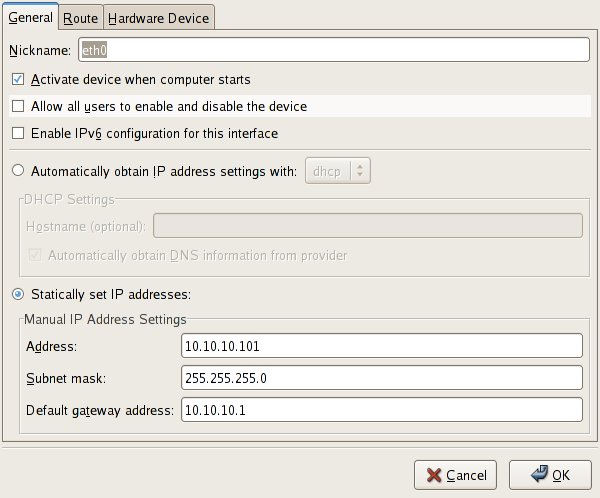
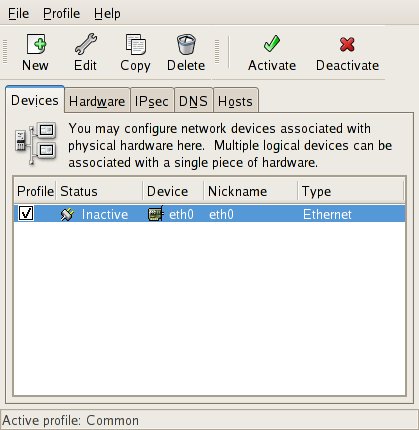
Highlight the line where you network card is presented and click on the EDIT button.
Enter the values for you network in the fields as on the picture on the top right.
Choose a ip address that you can use with your router. If the router is configured to controll 192.168.x.x something, you will have to use a 192.168.x.x address, 10.10.100.x a 10.10.100 address and so on.

Don't forget to activate and save!
That's it. Try and reboot your machine.
You can also view the ifcfg-eth0 file that was edited by the system-config-network script.
# cat /etc/sysconfig/network-scripts/ifcfg-eth0


Network IP address configuration Red Hat Fedora


Rebooted your server/workstation, only to notice that your network configuration is gone?
To make permanent network entries in Fedora or Red Hat and many other Linux distributions, you need to edit your ifcfg file. The ifcfg file should be located in /etc/sysconfig/network-scripts and named after your network cards interface name. Usually eth0 or eth1.

Two common ways to change and make permanent tcp/ip configurations.
  1. As user root ( symbolized with # ) change your directory to /etc/sysconfig/network-scripts
  2. # cd /etc/sysconfig/network-scripts
Use your text editor of choice. vi, nano, ed, emacs or perphaps pico. Oh, if you happen to run ed, type Q to get out. :-)

# vi /etc/sysconfig/network-scripts/ifcfg-eth0
DEVICE=eth0
BOOTPROTO=none
HWADDR=00:15:C5:08:3F:D5
ONBOOT=yes
TYPE=Ethernet
USERCTL=no
IPV6INIT=no
PEERDNS=yes
NETMASK=255.255.255.0
IPADDR=10.10.100.50
GATEWAY=10.10.100.1

This is what your ifcfg-eth0 or ifcfg-eth1 could look like after you have edit it.
NETMASK, usually 255.255.255.0 if you have want a usual /24 net.
IPADDR= Normally an 192.168.x.x or 10.10.10.x or 172.x.x.x address. Check your router/access point for details on what net it is configured to service.
GATEWAY= This should be the ip address of your router or access point.


November 27, 2006

Nokia E61

E61


I bought the E61 which is a piece of email queen 3 months ago, after drooling over my friends E61 for over 2 months. Nokia has delivered a beast for email and SMS. My expectations were high that day in septmember when I reached the disk at the phone shop. I remember thinking, "don't be sold out, please don't be sold out". The assistant in the shop could see my worried face turn into a huge smile when he laid the precious shiny smartphone on the desk. If you have the habit of always staying online, this is the phone.

  • WCDMA provides fast, wide-area connectivity
  • WLAN provides fast, local-area connectivity
If you read and send emails constantly, this is the phone.
You can check out the reviews here.
E61


  • Support for a choice of email solutions
  • Supports push email solutions that provide immediate notification when a new email is received (Intellisync Wireless Email, BlackBerry Connect, Good Mobile Messaging, Seven Always-On Mail, Visto email technology)1
  • Works with security and collaboration solutions (Nokia mVPN, Symantec Firewall and Anti-Virus, Pointsec Data Protection, IBM Tivoli, Nokia configurator)
  • Mail for Exchange2
  • POP3/IMAP supported in native email client
  • Contacts and calendar compatible with Microsoft Outlook and Lotus Notes
If you use MSN, Skype, VOIP you can use this phone.

If you want to watch your DVD's on a bigger than normal screen. This is the phone.
See smartmovie for Symbian and you'll know.

If you belive in smartphone security, this is a phone with a bunch of security features.
  • Internal security: device lock and device wipe
  • Additional security solutions separately available, such as Pointsec Data Protection and Symantec Firewall and Anti-virus

November 21, 2006

Burning CDs in Linux Unix

Some very basic cd burning commands. Non GUI, just command line.

cdrecord - record audio or data Compact Disks or Digital Versatile Disks from a master

Let's say you have a folder with files you want to backup by burning them to a CD or DVD.
First out would be to make an iso file of the files in the folder.
Example:

$ mkisofs -r -o filename.iso folder_to_make_iso_of
(filename.iso is the iso file you will burn in the next step)
Output, something similar to this

$ mkisofs -r -o wpa.iso wpa
INFO: UTF-8 character encoding detected by locale settings.
Assuming UTF-8 encoded filenames on source filesystem,
use -input-charset to override.
Using WPA_S000.TGZ;1 for /wpa_supplicant-0.4.9.tar.gz (wpa_supplicant-0.3.11.tar.gz)
Using DRIVE000.C;1 for wpa/wpa_supplicant-0.4.9/driver_bsd.c (driver_broadcom.c)
Using DRIVE001.C;1 for wpa/wpa_supplicant-0.4.9/driver_ndis.c (driver_ndis_.c)
Using DRIVE002.C;1 for wpa/wpa_supplicant-0.4.9/driver_ndis_.c (driver_ndiswrapper.c)
Using L2_PA000.C;1 for wpa/wpa_supplicant-0.4.9/l2_packet_freebsd.c (l2_packet_pcap.c)
Using WPA_S000.H;1 for wpa/wpa_supplicant-0.4.9/wpa_supplicant_i.h (wpa_supplicant.h)
Using DRIVE003.C;1 for wpa/wpa_supplicant-0.4.9/driver_wext.c (driver_wired.c)
Using L2_PA001.C;1 for wpa/wpa_supplicant-0.4.9/l2_packet_pcap.c (l2_packet_linux.c)
Using WPA_S000.SGM;1 for wpa/wpa_supplicant-0.4.9/doc/docbook/wpa_supplicant.conf.sgml (wpa_supplicant.sgml)
Total translation table size: 0
Total rockridge attributes bytes: 17015
Total directory bytes: 30720
Path table size(bytes): 104
Max brk space used 21000
1702 extents written (3 MB)


$ su - (switch to user root)
# cdrecord filename.iso
Example:

# cdrecord wpa.iso
cdrecord: No write mode specified.
cdrecord: Asuming -tao mode.
cdrecord: Future versions of cdrecord may have different drive dependent defaults.
cdrecord: Continuing in 5 seconds...
Cdrecord-Clone 2.01.01a03-dvd (i686-pc-linux-gnu) Copyright (C) 1995-2005 Jörg Schilling
NOTE: This version contains the OSS DVD extensions for cdrtools and thus may
have bugs related to DVD issues that are not present in the original
cdrtools. Please send bug reports or support requests to
http://bugzilla.redhat.com/bugzilla The original cdrtools author should
not be bothered with problems in this version.
scsidev: '/dev/cdrom'
devname: '/dev/cdrom'
scsibus: -2 target: -2 lun: -2
Linux sg driver version: 3.5.27
Using libscg version 'schily-0.8'.
cdrecord: Warning: using inofficial libscg transport code version (schily - Red Hat-scsi-linux-sg.c-1.85-RH '@(#)scsi-linux-sg.c 1.85 05/05/16 Copyright 1997 J. Schilling').
Device type : Removable CD-ROM
Version : 0
Response Format: 2
Capabilities :
Vendor_info : 'SONY '
Identifikation : 'DVD+-RW DW-Q58A '
Revision : 'UDS1'
Device seems to be: Generic mmc2 DVD-R/DVD-RW.
Using generic SCSI-3/mmc CD-R/CD-RW driver (mmc_cdr).
Driver flags : MMC-3 SWABAUDIO BURNFREE
Supported modes: TAO PACKET SAO SAO/R96P SAO/R96R RAW/R16 RAW/R96P RAW/R96R
Speed set to 1764 KB/s
Starting to write CD/DVD at speed 10.0 in real TAO mode for single session.
Last chance to quit, starting real write 4 seconds.

trackno=0
Track 01: Total bytes read/written: 3485696/3485696 (1702 sectors).


That's it!

For troubleshooting, try the --scanbus option and specify the device if you have more than one on your scsibus.

# cdrecord --scanbus (the --scanbus option, scsibus, target, lun)

Cdrecord has many options. See manpage.
$ man cdrecord

If you need to make your iso file bootable, look at the manual for mkisofs. (Several options)
$ man mkisofs
(This should not be needed if you have downloaded a live cd or a Unix Linux distribution. You should only need to burn the iso file, as is.)

November 20, 2006

Hardening your Red Hat or Fedora system


A few advices about hardening (securing) your Linux or Unix system. In my field of work, I come across a lot of different Unix and Linux systems. The majority of these system is protected by firewalls, local or on the network. This of course standard praxis today. What I don't always see is that these systems has been hardened in anyway. This has a number of reasons. One of the most common for systems running in production, is that this particular system is crucial for the business, and must not be down for any period of time. I can understand that, but some pit stops is going to be necessary to keep the system stable and secure. Patching a Unix or Linux server is usually a easy and quick procedure. One should of course backup the old working data before patching, and make sure there is a way to roll back, but that is almost all to it.

Now days almost every Linux distribution has a command line tool to accomplish a fast and reliable updates.

Red Hat
# yum

SuSE
# yast2

Debian

# apt-get

Gentoo

# emerge

Besides updating your server or workstation, you should take a look at what services your system is running. The goal should be to close all those unused services and ports that is only a potential way in for an intruder.

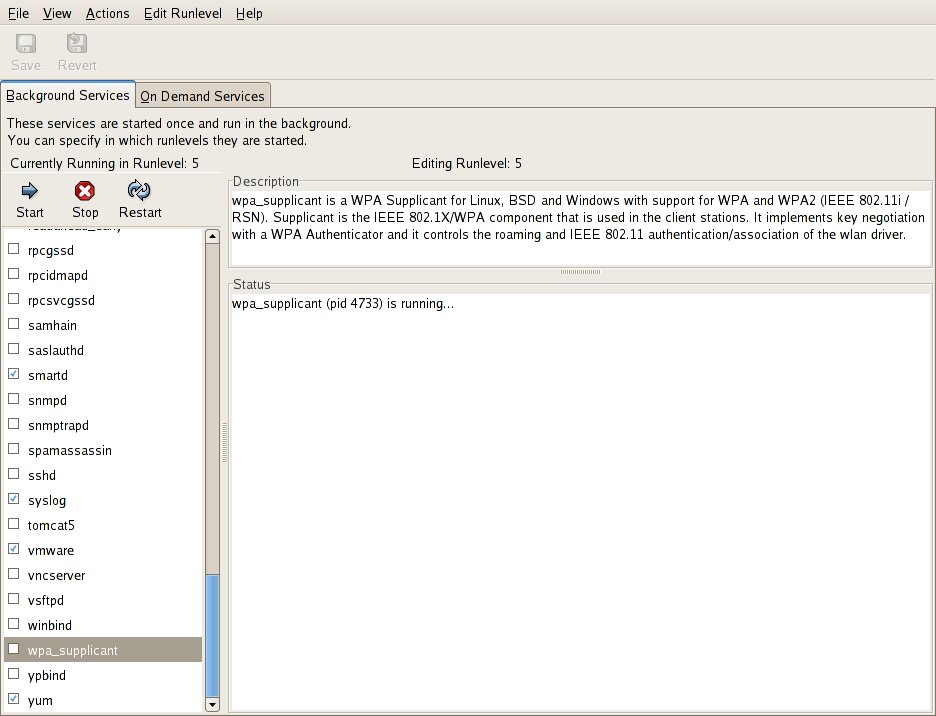
On Red Hat and Fedora, there is an excellent tool for managing your services, if you don't want to do it manually by moving run control scripts from every level of run control.

# system-config-services
Yupp, this is a graphical front end that should show you all installed services on your system. Even those not running for the moment. This is a great tool. Every service has a short description, which will make it easier for you to decide wetter it should run or not.

Ok, so lets say you have stopped a few services from the system-config-services window.
Oh, do not forget to save your settings!

Some services that is probably not necessary on a workstation.
named (DNS daemon)
httpd (apache webserver daemon)
nfs (network file system)
portmap (DARPA port to RPC program mapper)
ntpd (network time daemon)
nscd (name service caching daemon)
snmpd (simple network management protocol daemon)

What you might want to have running,
iptables (excellent local firewall)
sshd (Secure Shell daemon) will allow remote encrypted connection. (If you don't know what to use it for, turn it off!)
crond (schedule jobs)
apmd (monitors you battery level. For laptops)
irqbalance
syslog (system log messages)

This is just a tiny list of all the possible services you can have installed on your Linux or Unix box, but it is a start.

Now, you can check manually your active network status with the netstat command.

# netstat -an (will show you all listening and non-listening sockets in an alpanumeric way
You can pipe netstat -an to more and use spacebar to scroll down the list of connections.
# netstat -an | more
One easy way to see what ports your system is accepting connectons on is to use netstat and use the grep command.
[root@localhost ~]# netstat -an | grep LIST
tcp 0 0 :::22 :::* LISTEN

This shows you that your system is running a sshd server and that it is accepting connection on tcp port 22.

# netstat --tcp (shows you all active tcp connections)

[salt@localhost ~]$ netstat --tcp
Active Internet connections (w/o servers)
Proto Recv-Q Send-Q Local Address Foreign Address State
tcp 0 0 192.168.33.77:54758 32.107.37.11:http TIME_WAIT
tcp 0 0 192.168.33.77:41690 eh-in-f191.google.com:http ESTABLISHED
tcp 0 0 192.168.33.77:41688 eh-in-f191.google.com:http ESTABLISHED
tcp 0 0 192.168.33.77:45580 199.106.212.28:http TIME_WAIT

Try to run these commands every now and then, so you get a picture of what is normal network activity on your system. And you will be suprised how much you can learn from just watching the netstat outputs.

The last thing in this little brief hardening post is iptables. Iptables will provide your system some shelter if configured correctly.

To see what the current iptables is protecting run this command;
# iptables -nL
Iptables will show you all your active firewall policies.
If you are no familiar with the iptables syntax, don't worry. There is plenty of frontends for setting up the rules.

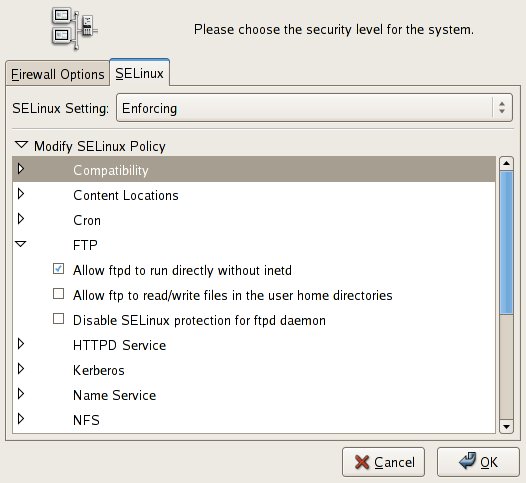
On Red Hat and Fedora, you simply run;
# system-config-securitylevel (as user root)
See picture on the top left of this post.
Here it is just a matter of clicking to enable or disable services like ftp, httpd, sshd etc. Your new firewall configurations will be automically enabled after saving.

Ok, this is a few hacks you can do. This does not mean that your server or workstation is secure!! But it will most likely not give anyone a simple and free entrance to break into your system.

Next post will cover some more advanced security enhancements.


November 19, 2006

Unix Linux Wireless and WPA


Wi-Fi protected access for you Unix Linux workstation can be a bit tricky the first time you set it up.
The setup I use in my example is from Fedora and Red Hat, but it should work on most Linux flavours and some Unix distributions. Oh, you will need to have a working ieee80211_crypt module and subsystem working with you kernel. Intel Wi-Fi card owners might check out http://ipw3945.sourceforge.net/ for some excellent resources.

To start using WPA or WPA-PSK you will need wpa_supplicant implementation installed on your box.


(Red Hat and Fedora user can download the wpa_supplicant rpm from Red Hat.
Fedora Core 5 users will find the rpm here.
http://redhat.download.fedoraproject.org/pub/fedora/linux/core/updates/5/i386/

# rpm -Uvh wpa_supplicant-0.4.9-1.fc5.i386.rpm

There is even a GUI ( frontend to wpa_supplicant at the Red Hat ftp site. Same directory as the wpa_supplicant rpm.

Source code way.
Check the author to wpa_supplicant site for the source code.

http://hostap.epitest.fi/ for the source code. Read the docs unpack the tarball and install.


$ tar -zxvf wpa_supplicant-0.4.9.tar.gz
Change directory to wpa_supplicant-0.4.9
$ cd wpa_supplicant-0.4.9
To build wpa_supplicant and wpa_cli
$ make
Now you can copy the binaries wpa_cli and wpa_supplicant to /usr/local/bin for example
$ su - ( you will most likely need to be root user for this, otherwise you might need to do a local security audit of your system. :-)

# cp wpa_supplicant wpa_cli /usr/local/bin/

(# Symbol for root user)

Now you should be ready to start testing.

If you are using the ipw3945d (binary user space regularity daemon) check that it is starting ok.

# ipw3945d
ipw3945d - regulatory daemon
Copyright (C) 2005-2006 Intel Corporation. All rights reserved.
version: 1.7.18

Next fire up wpa_supplicant

You will usually find the wpa_supplicant.conf file under /etc/wpa_supplicant/wpa_supplicant.conf

# wpa_supplicant -i eth1 -c /etc/wpa_supplicant/wpa_supplicant.conf -d
For an Intel ipw3945 based card, the driver used in this example should work.

Next you will have to edit you configuration file to include your pre shared key or certificate.

Example wpa_supplicant.conf file

ctrl_interface=/var/run/wpa_supplicant
ctrl_interface_group=wheel
#
# home network; allow all valid ciphers
network={
ssid="home"
scan_ssid=1
key_mgmt=WPA-PSK
psk="YourPassKeyGoesHere"
}

The psk= line can contain either your password in cleartext or the pre calc value of the shared key.

Then try to start and see if it can authenticate against your access point.

# wpa_supplicant -Dwext -i eth1 -c /etc/wpa_supplicant/wpa_supplicant.conf

You should see something like this;
Trying to associate with XX:XX:XX:XX:XX:XX (SSID='YOURSID' freq=0 MHz)
XX = Mac Address of your access point
Associated with XX:XX:XX:XX:XX:XX:XX:XX
WPA: Key negotiation completed with XX:XX:XX:XX:XX:XX:XX:XX [PTK=TKIP GTK=TKIP]
CTRL-EVENT-CONNECTED - Connection to XX:XX:XX:XX:XX:XX:XX:XX completed (auth)
WPA: Group rekeying completed with XX:XX:XX:XX:XX:XX:XX:XX [GTK=TKIP]

$ man wpa_supplicant (If you get stuck)
Try the -K option or -q for debugging

If everything works fine, you are ready to get an ip address to your interface.

Either statically assign or through a dchp request.

DHCP

# dhclient eth1

If you are using Fedora or Red Hat you should be able to install the rpm wpa_supplicant-0.4.9-1.fc5
# yum install wpa_supplicant

Supported wireless cards/drivers


One of the best wireless routers is by the way Linksys WRT300N

Linksys WRT300N Wireless-N Broadband Router

WIRELESS GARDEN SCB10 Super Cantenna 802.11b 802.11g Booster Antenna


Unix Linux or any paperback manuals


Or any paperback book covering the IT field, is usually heavy and takes a lot of the free space in
my backpack. I have tried to use the pdf files from the books, to read them from my mobile phone or pda, but the starring at colorful screen makes my eyes tired, so I bring the book instead.
Finally, Sony has a piece of hardware that could resolve the "problem". The have developed the Sony PRS-500, with E-ink technology from MIT. This peace of work could save my back and eyes. The E-ink uses micropulses and black and white nanoparticles to take care of the issues with reading tons of manuals. A full battery lasts about 7.500 pages, or 25 books. If there is good search feature, this baby rocks! Check it out, at sonystyle.com

November 17, 2006

Security Enhanced Linux GUI Frontend


Just a quicky about SE (Security Enhanced) Linux. SE Linux provides mandantory access control using LSM. (Linux Security Modules. Red Hat and Fedora provides quite a few security policy configurations by default. You can read more about SELinux here at http://fedoraproject.org/wiki/SELinux.

However, a few yeas ago, setting up SE Linux policies could be a daunting task, so I guess one or two ambitious sys admins got fed up and promised themselves to never ever use it again.

Today, you can just open up the GUI and start enforcing your protocols and services, such as ftp, kerberos, cron, named, nfs, samba, squid, sasl, ssl and many more.

So if you have not done it already, just do it.

# system-config-securitylevel

November 8, 2006

Oracle TNS connection with tnsnames.ora. Examples

Installed Oracle XE or 10g? Want to to connect but get error messages like;
ORA-12154: TNS:could not resolve the connect identifier specified?
Try checking your tnsnames.ora file. A sample tnsnames.ora file should be provided when you installed
the Oracle databas server. Can't find it? Here is a sample from the XE installation.

# tnsnames.ora Network Configuration File:


XE =
(DESCRIPTION =
(ADDRESS_LIST= (ADDRESS = (PROTOCOL = TCP)(HOST =192.168.XX.XX)(PORT = 1521)))
(CONNECT_DATA =
(SID = XE)
)
)

EXTPROC_CONNECTION_DATA =
(DESCRIPTION =
(ADDRESS_LIST =
(ADDRESS = (PROTOCOL = IPC)(KEY = EXTPROC_FOR_XE))
)
(CONNECT_DATA =
(SID = PLSExtProc)
(PRESENTATION = RO)
)
)


Port 1521/tcp is one of Oracle default ports for the TNS listener. TNS stands for Transparent Network Substrate. The TNS listener is responsible for managing network connections to the Oracle database.


The next step is to switch to your oracle user.
# su - oracle

From the prompt, you could now try and connect to your database with the SQLPLUS tool.
If you have default installation of Oracle XE 10g, try to log in with the hr account.

$ ./sqlplus

If you get the error message ORA-12162: TNS:net service name is incorrectly specified,
you have forgotten to specify Oracle's SID. You will need to provide the SID to sqlplus to be able to connect properly. The SID in this example is XE.

$ ./sqlplus hr/hr@XE

or

$ ./sqlplus /NOLOG


SQL*Plus: Release 10.2.0.1.0 - Production on Wed Nov 8 13:56:00 2006

Copyright (c) 1982, 2005, Oracle. All rights reserved.

SQL> connect hr@XE
Enter password:


Connected to:
Oracle Database 10g Express Edition Release 10.2.0.1.0 - Production

Make sure you have the tnsnames.ora file in your path. Under /etc for example.
/etc/tnsnames.ora

If you are unsure where sqlplus looks for you tnsnames .ora file. Try running the strace command with the trace option, and log it to a file for analysis.

$ strace -ft ./sqlplus > /tmp/sqlplus_strace

Ok, happy Oracle:ing.

September 6, 2006

New Fedora Core 5 updates available

Fedora Updates

September 5, 2006

09:40
--------------------------------------------------------------------- Fedora Update Notification FEDORA-2006-953 2006-09-05 --------------------------------------------------------------------- Product : Fedora Core 5 Name : openssl097a Version : 0.9.7a Release : 4.2.2 Summary : The OpenSSL toolkit. Description : The OpenSSL toolkit provides support for secure communications between
Source: FC5 Updates
Categories: Fedora Core
09:40
--------------------------------------------------------------------- Fedora Update Notification FEDORA-2006-953 2006-09-05 --------------------------------------------------------------------- Product : Fedora Core 5 Name : openssl Version : 0.9.8a Release : 5.3 Summary : The OpenSSL toolkit. Description : The OpenSSL toolkit provides support for secure communications between
Source: FC5 Updates
Categories: Fedora Core
08:51
--------------------------------------------------------------------- Fedora Update Notification FEDORA-2006-939 2006-09-05 --------------------------------------------------------------------- Product : Fedora Core 5 Name : xsane Version : 0.991 Release : 1.fc5 Summary : An X Window System front-end for the SANE scanner interface. Description : XSane is an X based interface for the SANE (Scanner Access Now Easy)
Source: FC5 Updates
Categories: Fedora Core
08:50
--------------------------------------------------------------------- Fedora Update Notification FEDORA-2006-938 2006-09-05 --------------------------------------------------------------------- Product : Fedora Core 5 Name : gimp Version : 2.2.13 Release : 1.fc5 Summary : GNU Image Manipulation Program Description : GIMP (GNU Image Manipulation Program) is a powerful image composition and
Source: FC5 Updates
Categories: Fedora Core
08:50
--------------------------------------------------------------------- Fedora Update Notification FEDORA-2006-952 2006-09-05 --------------------------------------------------------------------- Product : Fedora Core 5 Name : libtiff Version : 3.8.2 Release : 1.fc5 Summary : Library of functions for manipulating TIFF format image files Description : The libtiff package contains a library of functions for manipulating
Source: FC5 Updates
Categories: Fedora Core

August 30, 2006

Latest Debian Security Advisories

Security Advisories

[30 Aug 2006] DSA-1162 libmusicbrainz-2.0 - buffer overflows
[29 Aug 2006] DSA-1161 mozilla-firefox - several vulnerabilities
[29 Aug 2006] DSA-1160 mozilla - several vulnerabilities
[28 Aug 2006] DSA-1159 mozilla-thunderbird - several vulnerabilities
[27 Aug 2006] DSA-1157 ruby1.8 - several vulnerabilities
[27 Aug 2006] DSA-1156 kdebase - programming error
[25 Aug 2006] DSA-1158 streamripper - buffer overflow
[24 Aug 2006] DSA-1155 sendmail - programming error (new revision)
[24 Aug 2006] DSA-1155 sendmail - programming error
[20 Aug 2006] DSA-1154 squirrelmail - variable overwriting
[18 Aug 2006] DSA-1153 clamav - buffer overflow
[18 Aug 2006] DSA-1152 trac - missing input sanitising

Update your Debain distrobution now!

# apt-get update

Red Hat Enterprise Servers Security Update List

Here is a short list of security related updates for Red Hat Enterprise Servers.


RHSA-2006:0633 Moderate: ImageMagick security update 2006-08-24
Security Advisory RHSA-2006:0617 Important: kernel security update 2006-08-22
Security Advisory RHSA-2006:0634 Important: xorg-x11 security update 2006-08-21
Security Advisory RHSA-2006:0602 Moderate: wireshark security update (was ethereal) 2006-08-16
Security Advisory RHSA-2006:0354 Low: elfutils security update 2006-08-10
Security Advisory RHSA-2006:0393 Low: ntp security update 2006-08-10
Security Advisory RHSA-2006:0575 Updated kernel packages available for Red Hat Enterprise Linux 4 Update 4 2006-08-10
Security Advisory RHSA-2006:0582 Low: kdebase security fix 2006-08-10
Security Advisory RHSA-2006:0605 Important: perl security update 2006-08-10
Security Advisory RHSA-2006:0619 Moderate: httpd security update 2006-08-10
Security Advisory RHSA-2006:0612 Important: krb5 security update 2006-08-08
Security Advisory RHSA-2006:0603 Important: libtiff security update 2006-08-02
Security Advisory RHSA-2006:0609 Critical: seamonkey security update 2006-08-02
Security Advisory RHSA-2006:0615 Moderate: gnupg security update 2006-08-02
Security Advisory RHSA-2006:0610 Critical: firefox security update 2006-07-28

Latest Fedora Updates

Don't forget to Yum you installation! Here is a short list of the latest Fedora Core updates that are available.


If you aren't familiar with how to update your Fedora distribution, don't worry, here is how.
Switch to super-user root
$ su -
As user root run this commands
# yum update

Yum will fetch a list of recently updated packages and compare them to you own installation and then produce a list of packages that you could/should download. A simple confirmation of Yes or No is all it takes. Yum will take in consideration dependencies so you don't have to worry about that either.

Happy Updating!

Oh, and if you have the extra installed here is the list for those packages. Security related and others.

Fedora Extras dump-package security update (CVE-2006-3668)
[SECURITY] Fedora Extras 5 update: dia-0.95-3

August 18, 2006

Wireless at hot spots, Airports

Charles De Gaulle Airport 16:43

Going back after 2 1/2 day in the outskirts of Paris.
I visited the La Defense area, which is one of the big business district here.
The architecure is somewhat 60s, with a futurstic touch. The Parisiens here are much more friendly than I remember from my last visit to Paris, in 1996. Maybe it has to do with me getting older, and therefore more respect.

Waiting at the gate for the boarding to take place, I come to think about an old french cartoon I used to read in the 70s. I can really recall the name, but It was about a young office guy, who had a strange pet that got him into troubles, and as far as I can remember, the cartoon took place around the La Defense area.

Now to something completely different.

I have been in the bad habit of looking for 802.x networks for some years now, and I am still suprised by how many that is still not protected. At airports for example. If you are using the airports hot spot to let's say, check your email, bookings, bank account or whatever, all your internet traffic will go in cleartext, as the hot spots, rarely offers any encryption. I know this is for the convenience for the customers, so that they don't have to go thru the trouble setting up WEP or WPA keys, but I wonder if they are aware of the possibilty that someone can catch all their usernames and password that goes in clear text?

Top notch movie players for Linux, MPlayer

There is of course a hole bunch of movie player for Linux/Unix/Windows/Mac OS, but the one I would like to mention in particular, is MPlayer. The latest released version of Mplayer 1.0pre8 has been released since june, and can be downloaded from Mplayers website.

Mplayer supports some many different codecs today, that you should be able to play any file that contains audio or video streams. Play avi, mpg, ogg, mp3 files, wmv .. ... ... Great codecs for divx, xvid, DVD's, VCD etc.

  • OSS (Open Sound System) - factory standard under UNIX
  • SDL (Simple Directmedia Layer) - wrapper library with support for various systems
  • ALSA (Advanced Linux Sound Architecture) 0.5/0.9/1.0 for Linux
  • SUN audio driver for BSD and Solaris8/9 users
  • SGI audio for IRIX
  • Mac OS X audio
  • Windows audio
  • NAS (Network Audio System)
  • ESD (ESound Daemon)
  • ARTS (KDE Sound System)
  • JACK (Jack Audio Connection Kit)
Installation is really simple. There are prebuilt rpm files of MPlayer for Red Hat and Fedora on the Mplayer site. Otherwise, just download the source and compile the source from scratch.

First out is to download all the different codecs. You can find the codecs at MPlayer site.
You will need to copy all codec files to /usr/local/lib/codecs

After that, you are ready to install Mplayer.

$ bunzip MPlayer-1.0pre8.tar.bz2
$ tar -xvf MPlayer-1.0pre8.tar
$ cd MPlayer-1.0pre8
$ ./configure (with your options)
$ make
$ sudo make install (if you like to copy all the compiled binaries out of the source directory )

To start MPlayer from the command line, simply

$ mplayer -vo X11 spiderman.avi -fs -zoom
(fs = full screen )

Check out the creators website for details and to download MPlayer today.

http://www.mplayerhq.hu/design7/news.html


August 17, 2006

Orinoco Gold and Silver Wireless Cards

One of the best, or simply the best WiFi card ever made to the public, is the Orinoco Wireless PC Card.
It has an outstanding performance, and I have used it from various tasks, ranging from Warwalking, wardriving with laptops, pocket pc with pcmcia expansion kits, to working as the sole network adapter on a wireless server of mine. Besides that, it works great with a bunch of software, like Kismet, Netstumbler, Ministumbler, Airsnort, Aircrack etc.

The Orinco card has a security level that provides 802.1x authentication and encryption up to 152-bit WEP. It includes a built-in connector for an external Range Extender Antenna for longer distance connection. I have been using the Orinoco cards since late 2001, and am one really satisfied Orinoco user.
So if you are looking for a wireless card that really works, go Orinoco. Unix/Linux, Microsoft Windows and Mac OS, Pocket PC, Windows Mobile.

August 14, 2006

Poker sites that support Linux/Unix, Mac OS

As playing poker online and live is booming, more and more poker sites supports Linux/Unix and Mac clients. This is about time. Most of the clients are written and in Java, and are of course, as you all know platform independent. The graphics on the java poker clients vary in quality, but if you are a dedicated poker player, you will do just fine with out all the 3d stuff. The java clients are as far as I know sandboxed, so the should have a descent security. The only cutback is that they are not as fast as the original GUI's.

The following poker sites / rooms support Linux/Unix

Party Poker
PartyPoker
Poker Room
Team Tournaments are a new and exciting way to play real money poker side-by-side with your friends against other teams. Create a team with up to ten players and start to battle other teams.
Euro Poker
Play poker in your local language against players from around the world. Sign up now for free!
Holdem Poker (and Mac)
Play poker for free, thousands of players online now. No downloads needed. Join HoldemPoker.com, the fastest growing Texas Hold'em site online and get an exclusive $100 real money starting bonus!
Noble Poker
Noble Poker

Super Cantenna + Linux + Kismet


Could not resist buying the Super Cantenna when visiting Defcon 14. I have been curious on how well it really works, and now I decided to give it a try. A long with the Super Cantenna I bought a new Orinoco Gold Card. I sold my previous 2 Orinoco Gold cards years ago, and I have regretted it ever since.

2006.04.R1 of Kismet with the 0.13e Orinoco driver.
The Orinoco driver installed and loaded to the kernel smoothly on a Fedora 5 with the 2.6.16 kernel.
However, remember to remove any old orinoco modules from the kernel.

# rmmod orinoco_cs
# rmmod orinoco
# rmmod hermes

Load the new modules

# modprobe orinoco
# modprobe hermes

# iwconfig ethX "your settings"

Start your wifi net warwalk, or should I say war sit?
Wardriving, warwalking, sofawardriving is really interesting. It's extremely is to set up, so give it a try. Take a look at the internet traffic that flows thru your apartment every second.


Wireless Garden 12 dBi Super Cantenna SCB10
The Cantenna really rocks with Kismet and Netstumbler (Windows only).

Black Hat Briefings 2006 Las Vegas Nevada

Ahh! Came back from a marvelous 10 days in Las Vegas. Me and a couple of colleagues of mine attended
Black Hat briefings at Caesar's Palace. Lot's of really informational and important briefings was on the schedule, and only one of me. Cloning would have been handy here. I will have to settle with the slides from the other briefings. Or the DVD.

This year one of more relaxed briefings covered "Hacking Hollywood Style" with Johnny hack stuff. This briefing was incredibly funny and a nice break from all the other more serious topics.

All in all, Black Hat 2006 in Vegas was a success. I really like their program. The only thing I can whine about, is that there could have been one more day of briefings. :-)

Next up was Defcon. Defcons 14 was held at hotel Riviera in Vegas this year. Lot's of visitors as usual, and lots of fun!

Ok, time for some mexican food now. More coverage to come.

Oracle 10g and XE

A little tips to you Unix haxors that want to play with RDBMs. Oracle has been kind enough
to let us knowledgefreaks download 10g for free! This is great, as many of us has not been able to
play around with this beast of a database. I mean, besides your employeers production Oracle databases. LoL

So what are you waiting for? Open up an account with Oracle and download the software. There is a XE (Express Edition) that works fine on a laptop, if you dont want to install the full Enterprise Edition.

The installation works as a charm, just make sure to change the database password after the installation, and edit your local firewall rules to deny any source ip address besides does you trust. Which should not be many. :-)

What else, well, on a Fedora Core 5, if you have SElinux enforced, (check with getenforce command)
you might run into some problems with the SELinux ACL's. You might wan't to go offline with your Oracle database and modify your SELinux settings, so you don't leave a slot open for any intruders while modifying.

Check dmesg for more information if you run into problems starting Oracle on a SELinux enabled system.
It might look like this.

audit(1155563893.424:77): avc: denied { execmod } for pid=24499 comm="sqlplus" name="libnnz10.so" dev=dm-0 ino=4819681 scontext=user_u:system_r:initrc_t:s0 tcontext=system_u:object_r:lib_t:s0 tclass=file

If SELinux shows audit posts with avc deniced for sqlplus, you might have to disable SELinux to debug. Remember to put it on right away!

SELinux to permissve mode. (Just logging mode)
# setenforce 0

SELinux to Enforcing mode.
# setenforce 1

To display current mode for SELinux
# getenforce


To start oracle-xe for example, simply run the service command.
# service oracle-xe start

Enjoy!

June 23, 2006

Unix/Linux hacks and confs

I haven't had time to blog for a while, but I have an arsenal of Unix hacks to post about, so just stay put fellas. The world of Unix Linux is turning into virtualization, it seems. This has it's pros and cons of course, mostly pros in my opinion, as you will need less servers to provide your services. The investment will also be greater, at least initially, as virtualization can be rather expensive. But if you are administrating lots of servers, this might be worth the extra bucks, as the administration will be much easiser and smoother.

April 19, 2006

Rootkit Hunter Installation and Configuration Linux Unix

Mini guide to setup RootKit Hunter. Nothing bulletproof, as nothing is bulletproof, but a good start.

1) Download rootkit hunter
2) $ wget http://downloads.rootkit.nl/rkhunter-1.2.8.tar.gz
3) $ md5sum rkhunter-1.2.8.tar.gz (check file integrity. md5sum should be
41122193b5006b617e03c637a17ae982 )
4) Extract the files. $ tar -zxvf rkhunter-1.2.8.tar.gz
5) $ cd rkhunter
6) su - (root) or sudo ./installer.sh (visudo for privs)
7) # ./installer.sh (Install script, run as user root)

[salt@mimir rkhunter]$ ls
files installer.sh
[salt@mimir rkhunter]$ sudo sh ./installer.sh
Password:

Rootkit Hunter installer 1.2.4 (Copyright 2003-2005, Michael Boelen)
---------------
Starting installation/update

Checking /usr/local... OK
Checking file retrieval tools... /usr/bin/wget
Checking installation directories...
- Checking /usr/local/rkhunter...Created
- Checking /usr/local/rkhunter/etc...Created
- Checking /usr/local/rkhunter/bin...Created
- Checking /usr/local/rkhunter/lib/rkhunter/db...Created
- Checking /usr/local/rkhunter/lib/rkhunter/docs...Created
- Checking /usr/local/rkhunter/lib/rkhunter/scripts...Created
- Checking /usr/local/rkhunter/lib/rkhunter/tmp...Created
- Checking /usr/local/etc...Exists
- Checking /usr/local/bin...Exists
Checking system settings...
- Perl... OK
Installing files...
Installing Perl module checker... OK
Installing Database updater... OK
Installing Portscanner... OK
Installing MD5 Digest generator... OK
Installing SHA1 Digest generator... OK
Installing Directory viewer... OK
Installing Database Backdoor ports... OK
Installing Database Update mirrors... OK
Installing Database Operating Systems... OK
Installing Database Program versions... OK
Installing Database Default file hashes... OK
Installing Database MD5 blacklisted files... OK
Installing Changelog... OK
Installing Readme and FAQ... OK
Installing Wishlist and TODO... OK
Installing RK Hunter configuration file... OK
Installing RK Hunter binary... OK
Configuration updated with installation path (/usr/local/rkhunter)

Installation ready.
See /usr/local/rkhunter/lib/rkhunter/docs for more information. Run 'rkhunter' (/usr/local/bin/rkhunter)


8) Edit rkhunter.conf # vi rkhunter.conf
9) Setup rkhunter.sh as a daily cron job.
10) # vi /etc/cron.daily/rkhunter.sh
Add the following to rkhunter.sh

#!/bin/bash
(/usr/local/bin/rkhunter -c --cronjob 2>&1 | mail -s "RKhunter Scan Details" replace-this@with-your-email.com)

11) Add executing permission to rkhunter.sh,
# chmod +x /etc/cron.daily/rkhunter.sh

Good to go. Rkhunter will should report any changes made to user accounts, system and rc files, suspicious file properties in files like /bin/ps /bin/ls /usr/bin/w /usr/bin/who /bin/netstat /bin/login etc. And if you've got 0wn3d, a rootkit report.

Don't forget to check the author of Rkhunter's website. http://www.rootkit.nl


Programming Linux Hacker Tools Uncovered: Exploits, Backdoors, Scanners, Sniffers, Brute-Forcers, Rootkits (Uncovered series)

RootkitHunter - Scans for rootkits, backdoors, and sniffers

Rootkit scanner is scanning tool to ensure you for about 99.9%* you're clean of nasty tools. This tool scans for rootkits, backdoors and local exploits by running tests like:

- MD5 hash compare
- Look for default files used by rootkits
- Wrong file permissions for binaries
- Look for suspected strings in LKM and KLD modules
- Look for hidden files
- Optional scan within plaintext and binary files

Rootkit Hunter is released as GPL licensed project and free for everyone to use.

* No, not really 99.9%.. It's just another security layer

Rootkit can easily be run as cron job, and have the result mailed to you.

Tested on:
- AIX 4.1.5 / 4.3.3
- ALT Linux
- Aurora Linux
- CentOS 3.1 / 4.0
- Conectiva Linux 6.0
- Debian 3.x
- FreeBSD 4.3 / 4.4 / 4.7 / 4.8 / 4.9 / 4.10
- FreeBSD 5.0 / 5.1 / 5.2 / 5.2.1 / 5.3
- Fedora Core 1 / Core 2 / Core 3
- Gentoo 1.4, 2004.0, 2004.1
- Macintosh OS 10.3.4-10.3.8
- Mandrake 8.1 / 8.2 / 9.0-9.2 / 10.0 / 10.1
- OpenBSD 3.4 / 3.5
- Red Hat Linux 7.0-7.3 / 8 / 9
- Red Hat Enterprise Linux 2.1 / 3.0
- Slackware 9.0 / 9.1 / 10.0 / 10.1
- SME 6.0
- Solaris (SunOS)
- SuSE 7.3 / 8.0-8.2 / 9.0-9.2
- Ubuntu
- Yellow Dog Linux 3.0 / 3.01

Confirmed to work also on:
- DaNix (Debian clone)
- PCLinuxOS
- VectorLinux SOHO 3.2 / 4.0
- CPUBuilders Linux
- Virtuozzo (VPS)

Rootkit hunter will search for:

'Supported' rootkits/backdoors/LKM's/worms:


55808 Trojan - Variant A
ADM W0rm
AjaKit
aPa Kit
Apache Worm
Ambient (ark) Rootkit
Balaur Rootkit
BeastKit
beX2
BOBKit
CiNIK Worm (Slapper.B variant)
Danny-Boy's Abuse Kit
Devil RootKit
Dica
Dreams Rootkit
Duarawkz Rootkit
Flea Linux Rootkit
FreeBSD Rootkit
Fuck`it Rootkit
GasKit
Heroin LKM
HjC Rootkit
ignoKit
ImperalsS-FBRK
Irix Rootkit
Kitko
Knark
Li0n Worm
Lockit / LJK2
mod_rootme (Apache backdoor)
MRK
Ni0 Rootkit
NSDAP (RootKit for SunOS)
Optic Kit (Tux)
Oz Rootkit
Portacelo
R3dstorm Toolkit
RH-Sharpe's rootkit
RSHA's rootkit
Scalper Worm
Shutdown
SHV4 Rootkit
SHV5 Rootkit
Sin Rootkit
Slapper
Sneakin Rootkit
Suckit
SunOS Rootkit
Superkit
TBD (Telnet BackDoor)
TeLeKiT
T0rn Rootkit
Trojanit Kit
URK (Universal RootKit)
VcKit
Volc Rootkit
X-Org SunOS Rootkit
zaRwT.KiT Rootkit

Rootkit Developers Site http://www.rootkit.nl/

- 1.2.8 Latest release (MD5 (rkhunter-1.2.8.tar.gz) = 41122193b5006b617e03c637a17ae982)

April 13, 2006

Spring time cold, Unix Linux hacking food rant.

Day 7 of a stubborn cold and I am going to go bezerk on my soar throat and thick nose.
It's just so frustrating have a high fever. You can't read, eat, walk, talk. Just lay down and
sweat for days. Nothing productive in that!! I always get seriously mad at myself for getting a cold
or the flue, because I'm usually an expert in avoiding it. Avoiding it you might think to yourself.
Well, actually, just being pro-active with vitamines, garlic, chili, ginger and good hand hygiene.
This has worked for years for me, but not this spring. And I am in the middle of changing jobs, and
having tons of documenation to do, people to meet, meetings to be held etc...

So after taking a combination of pain killers and some fresh ginger, I'm good for a couple of hours of work.

To be very pro-active, I think I am going to stay at home all easter, doing nothing but some reading and watching TV with my family. A real Homer weekend. Dooo! :-)

And only eat very spicy food, to nuke the flue.

April 6, 2006

Compromised computer, Recovery options

What to do if your computer/client/server/box/machine/pda has been
compromised.

Most likely you will have to reinstall everything from scratch.
If you have been compromised, you might not want to trust your
backups anymore, unless the backup was burned down on CD or
DVD media.

Here is a few important links to consider reading.

Live-CD Diagnostics
http://www-128.ibm.com/developerworks/linux/library/l-livecddiag/

CERT®/CC Steps for Recovering from a UNIX or NT System
Compromise:
http://www.cert.org/tech_tips/win-UNIX-system_compromise.html

Microsoft Says Recovery from Malware Becoming Impossible
Link

Help: I Got Hacked. Now What Do I Do? - Microsoft TechNet:
Security Management Column:
Security Management

Anti-Malware Engineering Team : News on Alcan, Mywife.E:

April 5, 2006

Unix Linux Network Configuration and Troubleshooting

Configure your Linux Network example. Change IP address, netmask and
default route (your gateway) to your own settings. If the ip addresses
are dynamically distributed with the DHCP protocol, you should only need
to run.

# dhclient eth0 (or the name of your nic)

If static, read here.
$ su -
Change to root account

The # is the symbol for root user

# ifconfig eth0 192.168.0.1 netmask 255.255.255.0 (ip address and netmask)
# route add default gw 192.168.0.3 (default router setting)

# ping 192.168.0.3 (check if you can connect to your router)
If everything works ok, you should get echo replies.

[salt@mimir ~]$ ping 192.168.0.3
PING 192.168.0.3 (192.168.0.3) 56(84) bytes of data.
64 bytes from 192.168.0.3: icmp_seq=0 ttl=255 time=3.26 ms


Troubleshooting a Linux Network LAN

# ifconfig eth0 down (take down network interface eth0)
# ifconfig eth0 up (take up network interface eth0)
# ping localhost
# dmesg | grep eth0 (check if eth0 was starting ok at boot up)
# tail -f /var/log/messages (tail messages while troubleshooting)
# check your cables (Don't laugh, this is more common than you
think)

In a production network, check with the administrator if there is any Access List on MAC
addresses in the switch.

Check if you need to have an entry in the networks DHCP servers configuration.

If wireless, check your WEP, WPA, WPA2, ESSID values.

# iwcondfig wlan0 essid (value)

Good Unix Linux Hacking Music Chronix Radio

Wednesday morning, woke up on the sofa, after being departed there by wify for snoring. Kissed my boys and wife good bye and took the subway to work as usual.
Put on my mp3 player and listened to my Gig of music. Tired of the same tunes, I googled for
a good metal shoutcast station. And there it was. Chronix Radio, Yes, yes, yes.
My adrenaline level started to get back on a comfortable level again. The workflow
accelerated and everything felt just great again. Thank you for the great shoutcast broadcast of metal music guys.

http://www.chronixradio.com/


Song: "open" Album: the Nothing Artist: Sap Label: TJO Records

Good hacking music.
Song: "Crawl Through Knives" Album: Come Clarity Artist: In Flames Label: Ferret Records

Song: "Taste My..." Album: Pass Out Of Existence Artist: Chimaira Label: Roadrunner Records

Song: "Into The Darkness (Vocal Remix)" Album: Until The End Artist: Kittie Label: Artemis Records

Song: "Death Rattle" Album: Reinventing The Steel Artist: Pantera Label:

Song: "Surfacing" Album: Slipknot Artist: Slipknot Label: Roadrunner Records

Song: "In A Zone" Album: Stomp 442 Artist: Anthrax Label: Edoya

Song: "Slave The Way(Remix)" Album: Nerve Damage Disk 1 Artist: Skinlab Label: Century Media


RAMMSTEIN - MANN GEGEN MANN
SILENCER - THE HARVEST
JUDAS PRIEST - REVOLUTION
ROB ZOMBIE - FOXY FOXY
PLACEBO - SONG TO SAY GOODBYE
BAD RELIGION - PUNK ROCK SONG
WHITE STRIPES - MY DOORBELL
DECAPITATED - REVELATION OF EXISTENCE lyrics

March 30, 2006

SELinux, commands to use, Part I, getting familiar with the SElinux commands

Ok, so you installed RHEL 4, and SELinux is enabled by default. Now what?
Well, I would say, take this opportunity to enhance the security of your server or
workstation. Security Enhanced Linux is here to stay, and it will just get better and
easier to use. For now, there is two ways to work on that enhanced shield that SELinux provides. Either you use the GUI for SELinux, # system-config-securitylevel or you do it from the CLI, (command line), with setenforce, setsebool, getenforce, getsebool and some arguments.

Examples;

/usr/bin/sestatus (Get status of the system running SELinux)
/usr/sbin/setsebool (Set SELinux boolean value)
/usr/sbin/getsebool (Get SELinux boolean value)
/usr/sbin/setenforce (Modify the mode SELinux is running in
/usr/sbin/getenforce (Get the current mode of SELinux)

If you want to set SELinux in Enforcing mode,

# setenforce 1 (You will not see any output)

Verify the mode with

# getenforce
Enforcing

# setenforce 0 (Set SELinux in Permissive mode, only warnings, no protection)

# getenforce
Permissive

# getsebool -a (Get SELinux boolean value(s))

# setsebool httpd_enable_homedirs 1 (Enable httpd homedir /public_html in apache)

SELinux configuration and policy files, macron and more here;

/etc/selinux/
/etc/sysconfig/selinux is a symlink to /etc/selinux/config

End of part I

March 28, 2006

Linux Encryption Tools, BestCrypt

Encryption for Linux

A few years ago I tried out BestCrypt's Encryption for Linux. My setup was that I had
a single partition which I used for encrypted data. It worked really well, and the partition was password protected at boot time. In other words the partition was mounted
only if I provided the valid password. If no password was provided, the mount of that partition would be dropped, but the rest of the system would boot up as usual.
As far as I can remember, I used the Blowfish in Cipher Block Chaining Mode.

Current release for Linux is 1.6-3 and you can even download the BestCrypt Development
Kit, if you feel for hacking some crypto software and algorithms.

BestCrypt can be found at http://www.jetico.com/
BestCrypt is available for Linux, Windows 95/98/ME/NT/2000/2003 Server/XP/XP x64 as version 7.20.2

Unix Linux files hacks for better security. SUID/SetUID/SGID removal


A few simple shell commands to use. Checking for the "dangerous" "superuser" files.

For security reasons, you should try and avoid having SUID/SetUID/SGID bit on files on your systems. Have a cron job to check for files with the SUID/SetUID/SGID bit set. Consult the documenations, like the man pages, and have the SUID/SGID removed if possible. Test the application in a test environment, and check if it's fully operational before changing permissions on your live/production systems.

Here is a few simple commands you could setup to run with cron, on a daily basis, to
check for SUID/SetUID bit files on you systems.

To find files with the SUID bit set, you could run

# find / -type f -perm 04000 -ls

[root@SUID ~]# ls -lrt /usr/X11R6/bin/Xorg
-rws--x--x 1 root root 1996468 Dec 9 2004 /usr/X11R6/bin/Xorg <--- SUID file example.


To find files with the SGID bit set, you could run

# find / -type f -perm 02000 -ls


To find World-Writable Files

find / -perm -2 -type f -print

Change all files that has no valid reason to be world writable.

Hardening SuSE, Red Hat, Fedora, Gentoo, Solaris, Debian and Slackware tools.

Bastille: http://www.bastille-linux.org/
Red Hat (Fedora Core, Enterprise, and Numbered/Classic), SUSE, Debian, Gentoo, and Mandrake distributions, along with HP-UX and Mac OS X.


Sun Solaris Hardening
Sun has released JASS v0.11, a hardening tool for Solaris. here, we take it for a test drive.
http://www.sun.com/blueprints/tools

JASS stands JumpStart Architecture and Security Scripts (Toolkit).
http://www.sun.com/blueprints/browsesubject.html#security

Yassp Security Draft
http://www.boran.com/security/sp/Solaris_hardening3.html

March 27, 2006

Simple hack getting xchat, iirc, ftp, wget, lynx and other protocols, through squid proxy, and other Unix/Linux proxies.

Here is a simple little Linux/Unix hack, If you are having a problem getting your packets through a proxy with iirc, xchat, lynx, wget, ftp or some other application or tool.

The symptoms for not getting through the proxy is usually a session time out. The applicatons sends it's SYN packets, but will never recieve any from
the non responding server on the other end of the TCP handshake.

Three way handshake TCP

Client Server

1) SYN 2) SYN-ACK
3) ACK


If you're proxy allows, you can always try to export a http_proxy or ftp_proxy, (works with squid)

Examples,

$ export http_proxy=1.2.3.4:8081 (ip address and port number, usually 8080, 8081 of the proxy server)

or/and


$ export ftp_proxy=1.2.3.4:8081 (ip address and port number of the proxy server)

To verify that the environment variable for http/ftp proxy is set, just echo
$ echo $http_proxy

You should see http://ip.address.of.proxy:port_number

Make sure you include the $ sign. $http_proxy, $ftp_proxy

March 22, 2006

Linux and Unix useful command list, mini version, ping, netstat, ifconfig iptables

Unix/Linux useful commands, mini version

For troubleshooting a Linux system you might,
want to try one of the following Linux commands.
These commands and flags might not be viable on everyones system.

# lspci list all your pci devices
# dhclient eth0 renew your dhcp release
# ifconfig wlan0 check your wireless network configuration
# netstat -arn show your network route information
# netstat -ap 2 | grep EST show established connections, updates every 2 sec
# netstat -Cr print routing information from routing cache
# iptables -nL show your current iptables configuration in numeric form
# ping ping 127.0.0.1 or network ip address for ICMP replies
# ping -c ping X times.
# ping6 ping ipv6 addresses
# dmesg print or control the kernel ring buffer, bootup messages
# dmesg | grep eth0 if you missed the bootup sequence, and need to check eth0
# nmap -vvv localhost scan yourself for open ports, vvv = extra verbose
# ssh secure shell, encrypted remote login program, client
# ssh -l user host ssh as user to host, ssh -l donald server1.sshexample.com
# uptime check your linux servers uptime and load

March 19, 2006

Linux System Security Enhancing

Linux System Security
Enhancing Security In Linux.

SELinux
http://www.nsa.gov/selinux/

SELinux stands for Security Enhanced Linux, and is an implementation of Linux
Security Modules (LSM ) in a Linux kernel.


SELinux for distributions
SELinux for different distributions can be found here.

SELinux Getting Started HOWTO


http://www.lurking-grue.org/selinuxHOWTO.html


AppArmor

http://en.opensuse.org/Apparmor


GrSecurity

grsecurity is an innovative approach to security utilizing a multi-layered detection, prevention, and containment model. It is licensed under the GPL.
It offers among many other features:
  • An intelligent and robust Role-Based Access Control (RBAC) system that can generate least privilege policies for your entire system with no configuration
  • Change root (chroot) hardening
  • /tmp race prevention
  • Extensive auditing
  • Prevention of entire classes of exploits related to address space bugs (from the PaX project)
  • Additional randomness in the TCP/IP stack
  • A restriction that allows a user to only view his/her processes
  • Every security alert or audit contains the IP address of the person that caused the event


March 16, 2006

Mini howto for Red Hat Linux Network and Internet Services

Mini howto for Linux Network and Internet services, using chkconfig
and service commands.

Easy way in Red Hat is by using the service command.
Swith to user root. su -
If you don't you will get bash: chkconfig: command not found

# service httpd stop
# service httpd start

This will not make permanent changes in you run control directories.
So if you want to make a permanent change to the run control
for a service, you will have to issue the chkconfig command.

Like this,

# chkconfig httpd off

Verify it with

# chkconfig --list httpd

You will see something like this in your output.

httpd 0:off 1:off 2:off 3:off 4:off 5:off 6:off

So the next time you reboot, httpd will not start by
the run control scripts. You may of course be able to start it
manually with the command (as user root)

# service httpd start

If you really want to make sure the httpd process is up,
you can check the daemon and if it is listening on your network
interface. (Ready to accept connections from the network)

$ ps -ef | grep httpd
$ netstat -ap | grep http

The output from the ps command should look something like this
root 23291 1 0 Mar11 ? 00:00:02 /usr/sbin/httpd
apache 22444 32227 0 Mar 11 ? 00:00:34 /usr/sbin/httpd

The output should look something like this. (netstat)
tcp 0 0 *:http *:* LISTEN -

These command goes for all services listed by the
# chkconfig --list

March 7, 2006

Unix Linux Install Command List and Mini Guide

This mini guide is ment to be of some help for rookies on Linux/Unix started on
installing applications and software on Unix/Linux systems.

Install Howto, commands, mini guide.


Unix Systems/Dialects

Solaris/SunOS Examples: As user root. ( # sign = root, $ sign = user )

# pkgadd -d gcc-2.95.2-sol7-sparc-local (Installs solaris package)
# pkginfo -l (Verify installation)
# pkgrm (Remove package, you will have to answer yes/no)
# patchadd /var/spool/patch/104945-02


Linux Systems/Dialects

Red Hat, Examples: As user root. (# symbolizes user root)

# rpm -ivh kernel-2.6.9-5.EL.rpm (Install command)
# rpm -q kernel-2.6.9-5.EL.rpm (Query/Verify)
# rpm -e kernel-2.6.9-5.EL.rpm (Remove/Delete)


Debian, Examples: As user root.

# apt-get install xchat
# apt-get remove gnome-panel
# apt-get update (update to the latest package info)
# apt-get -u upgrade

# apt-get -u dist-upgrade (upgrade to a new release)


SuSE

Same as Red Hat.

GCC Gnu Cross Compiler

When downloading the source code in a tarball format, you will
usually need to decompress the files. This is done with tar, bunzip,
gunzip, or unzip, depending on how the file is packed.

Linux Magazines Review

Imagine sitting down, after a long days work, in your favorite sofa/chair, the kids sleeping, just you and a fresh issue of Linux Journal or/and Sys Admin Magazine, a hot cup of tea or coffee and some snacks. After reading a while, your creative mind starts to go europhoric with all brand new ideas and inspiration you just got. You just have to sit down all night until dawn and hack your keyboard away. Isn't that a *nix Utopia of a fantastic night at home or what!?


Linux Magazine Review. My subjective (completely personal) review.
Sys Admin Review. My subjective (completely personal) review.

As of today, the flora of Linux magazines is peaking, there is virtually not a single serious computer magazine not mentioning Linux, and the range of "pure Linux magazines is long as shellcode eggdrop soon. Among my personal favorites in the Linux/Unix
sphere of magazines, is Linux Journal Magazine and Sys Admin Magazine, they both have my warmest
recommendations.

What so nice with these two Linux/Unix magazines is the short but
informative articles on system administrator tasks. You can pick up some
very hefty knowledge in practically no time. They are great on their coverage
of the latest trends and visions. Excellent writers and editors.

Some of the top Unix/Linux/Developers/Coder profiles contributes with information and articles. The magazines covers all different Unix and Linux flavors. AIX, Solaris, Red Hat, SuSE, Debian, HP-UX, IRIX, Slackware, SCO, Knoppix. Programming languages, perl, python, java etc. Linux Journal and Sys Admin complement each other, Linux Journal brings you review a lot of the latest open source software, Sys Admin, more conservative, and more in depth technical articles. The best of two *nix worlds.


March 1, 2006

SElinux basic information Security Enhanced Linux

SElinux comes as a default module in RHES 4, which is really good, as it by default defends some network daemons like, httpd, nscd, bind/named, dhcpd, mysqld, ntpd, portmap, postgresql, snmpd, squid and syslogd.
My "subjective" advice is to NOT turn off SELinux, and to run it enabled and in at least targeted mode. Especially if you are running any network daemons like those mentioned earlier.

SElinux policy can be used in targeted and strict mode. The targeted mode is a rework of the strict policy, and concentrates on protecting vulnerable services and daemons and not the hole operating system. This
makes it much easier to start using SElinux. Red Hat for example (or Fedora) is writing policies for even more services and daemons. I belive they will realese a list of 55 or more protected services soon.

If you are interested in writing your own SElinux policies you might want to have a look at apol
and or sepol.

Technorati Tags:
, , , , , , , , , ,

Del.icio.us Tags:
, , , , , , , , , ,


February 10, 2006

Nokia 770 Review - Linux based beauty sees the horizon.


A new beautiful peace of Nokia has arrived. This uber-smart-phone handles almost everything, and makes your notebook obselete. And it runs on Linux!

The Nokia 770 Internet Tablet's software is upgradeable and currently runs on the Linux-based Internet Tablet 2005 software edition. There is a planned launch next year of an operating system upgrade – the Internet Tablet 2006 software edition – that will support additional services, including Internet telephony (VoIP) and Instant Messaging.

With the Nokia 770 Internet Tablet you can browse your favorite sites and catch up on your email – from right where you are. Whether you're relaxing on the sofa or enjoying the moment at your favorite café, if you have broadband access over WI-FI the Nokia 770 Internet Tablet gives you instant wireless access to the Web. You can also stream files, tune in to Internet radio, News Reader, or play your favorite videos and music.

# Memory: Flash 128MB (>64MB for user)

# Memory card: 64MB RS-MMC (Reduced Size - MultiMediaCard)

Read More ->
Nokia 770


Technorati Tags:
, , , , , , , , , ,


Del.icio.us Tags:
, , , , , , , , , ,

February 9, 2006

Unix/Linux hacks and confs. Red Hat, SuSE, Debian, Knoppix, Slackware: Splunk review (free version)

Unix/Linux hacks and confs. Red Hat, SuSE, Debian, Knoppix, Slackware: Splunk review (free version)

February 2, 2006

Nmap 4.0 released. Review here.


Nmap, one of the most popular, and best (my opinion) Network Mappers has reached version 4 today. Nmap is a free Network Mapper and has a range of nice pen-test features. Both as a traditional command line tool $ nmap -v -A target_host, and with a GUI (Graphical User Interface). I came in contact with nmap back in 1999, version 2.x something, and it's has been my companion ever since.


Nmap is perfect if you want to make certain what ports you are exposing, and what
services that are running. I always use nmap to make a last check before I plug a new
machine online. This is good common practice, even if you are only going online with your home office machine.


Installation example from a Linux box.
[user@mimir INCOMING]$ tar -zxvf nmap-4.00.tgz


(Extract the compressed tarball, the *.tgz is
gzip and tar:ed, so you will need the Z before gz, or gunzip the tarball first and the use # tar -xvf
to extract all the files.


Next step is to cd (change directory ) into the source dir of nmap.
[user@mimir INCOMING]$ cd nmap-4.00


[user@mimir INCOMING]$ ./configure
(Run the configure script, using the default options first)
You will see a great deal of output echo:ed to your terminal.


If all goes well, you should be ready to compile nmap.
checking for pkg-config... /usr/bin/pkg-config
checking for GTK+ - version >= 2.0.0... yes (version 2.4.13)
checking build system type... i686-pc-linux-gnu
checking host system type... i686-pc-linux-gnu
configure: creating ./config.status
config.status: creating Makefile


[user@mimir INCOMING]$ make
(make command to compile the source into executable binaries)
This can take some time, depending on your computers resources, but on 1 GHz with 512 RAM, about 3-4 minutes top.


If you want nmap to be installed in /usr/local/bin you will need root privileges.
If that is the case (congrats) you just type # make install as user root. ( su - command to switch to user root)


Here is sample output from an nmap scan of localhost (127.0.0.1) the loopback interface.


[user@mimir INCOMING]$ ./nmap -v -sT localhost

Starting Nmap 4.00 ( http://www.insecure.org/nmap/ ) at 2006-02-01 20:44 CET
Machine 127.0.0.1 MIGHT actually be listening on probe port 80
DNS resolution of 0 IPs took 0.00s. Mode: Async [#: 1, OK: 0, NX: 0, DR: 0, SF: 0, TR: 0, CN: 0]
Initiating Connect() Scan against localhost.localdomain (127.0.0.1) [1672 ports] at 20:44
Discovered open port 443/tcp on 127.0.0.1
Discovered open port 21/tcp on 127.0.0.1
Discovered open port 80/tcp on 127.0.0.1
Discovered open port 3306/tcp on 127.0.0.1


The Connect() Scan took 0.46s to scan 1672 total ports.
Host localhost.localdomain (127.0.0.1) appears to be up ... good.
Interesting ports on localhost.localdomain (127.0.0.1):
(The 1667 ports scanned but not shown below are in state: closed)
PORT STATE SERVICE
21/tcp open ftp
80/tcp open http
443/tcp open https
3306/tcp open mysql


Nmap finished: 1 IP address (1 host up) scanned in 0.949 seconds


Remember!, Nmap is a powerful tool, and should be used with care. I have seen hosts ( I will not mention what OS) that has taken a nose dive, after being scanned by nmap. (This is of course not the purpose of nmap, but it could happen). So don't go off scanning a production environment before
you know for sure what will happen on the scanned hosts.


Ok, may nmap force be with you!


One final note. If you have seen Matrix 2, reloaded, you have seen nmap in action. Trinity used it to target some host in the movie.


Nmap is free and open source and source code for *nix, Windows and MacOS is available.
Download Nmap here


Technorati Tags:
, , , , , , , ,

February 1, 2006

Online pen-test tools, How secure are you and your clients/servers?


Online pen-test tools


traceroute - print the route packets take to network host
Uses the IP protocol time to live field and attempts to elicit an ICMP TIME_EXCEEDED response from each gateway along the path to some host.
(shows all the routers hops between host A to B. Useful for problemshooting network
problems, mapping network infrastructure etc.. On Unix/Linux systems you can use traceroute with the -I flag, which is an ICMP flag. Traceroute uses UDP packets by default. As UDP (User Datagram Protocol)is a stateless protocol, and with low priority for routing protocols. This means that the if the load between
two networks are heavy, the routers will drop the traceroute UDP packets with ease.


[salt@mimir ~]$ /usr/sbin/traceroute -I host_to_traceroute Version 1.4a12


Usage: traceroute [-dFInrvx] [-g gateway] [-i iface] [-f first_ttl]


[-m max_ttl] [ -p port] [-q nqueries] [-s src_addr] [-t tos]


[-w waittime] [-z pausemsecs] host [packetlen]


Online Traceroute can be found here


Online Perimeter and Content Scanning
Linux Sec Dot Net.


Lots of online tools, Use with care, abuse is and will not be tolerated.


Online port scanners, nessus scanners, dns scanners, apache scanners, firewall testers, open relay tests,
virus scanners and much more..


Technorati Tags:
, , , , , , , , , , ,


Technorati Tags:
, ,

January 25, 2006

Fwanalog, analys your firewall logs now!


I have tried out fwanalog some time ago, and I am really impressed of the work the coder has done with shell scripts. If you consider the commercial software CheckPoint sells, (Reporter), you will
find this tool alot more useful. So start parsing your firewall logs today!


fwanalog is a shell script that parses and summarizes firewall logfiles. It currently (version 0.6.9) understands logs from ipf (tested with OpenBSD 2.8's and 2.9's ipf, also FreeBSD, NetBSD and Solaris 8 with ipf (+ ipfw on FreeBSD)), OpenBSD 3.x pf, Linux 2.2 ipchains, Linux 2.4 iptables, some ZyXEL/NetGear routers and Cisco PIX, Watchguard Firebox, Firewall-One (not NG!), FreeBSD ipfw and Sonicwall firewalls.


(You might need to change the shebang line to bash on non-free Unixes that don't ship with a powerful enough /bin/sh.)

It can be easily extended for other logfile formats, all it takes is editing two regular expressions.


Fwanalog uses the excellent log analysis program Analog (also free software) to create its reports. It does so by converting the firewall log into a fake web server log and calling Analog with a modified configuration.

Technorati Tags:
, , , , , , , , ,

January 10, 2006

Splunk review (free version)


Tried out the Splunkserver , (Red Hat Enterprise Server 4, Kernel 2.6.9-5.EL)
(Splunk Server version 1.1 build 3772) to be exact
and the first review concerns installation, look and feel.

I am an experienced Unix/Linux Sys Admin, but the installation was a just a kick, and the installation script gave me options with yes or no, which made it extremely easy to install. Just chmod splunk-Server-1.1-linux-installer.bin (chmod +x) so it's excecutable and start the install phase with # ./splunk-Server-1.1-linux-installer.bin.


Starting the Splunkserver was as easy. Run the splunk Bourne Shell Script as follows,


[root@mimir splunk]# /opt/splunk/bin/splunk start
== Checking prerequisites...
Version is Splunk Server
Checking http port [8000]: open
Checking https port [8001]: open
Checking mgmt port [8089]: open
Checking search port [9099]: open
== All checks passed
Starting splunkd [ OK ]
Starting splunkSearch [ OK ]


You might have a problem with the ports, as your local firewall, that you have enabled (yes, a must have) will not let you connect to these ports by default. If you're connecting thru localhost, this shouldn't be much of a problem.

Check out netfilter/iptables for localhost access otherwise. You are also able to choose other ports, that may suit your firewall needs better. Just be sure that the are not taken buy another service.


As I am an IT security freak, I don't want any ports to bind to my external face (internet) if avoidable, so I would recommend defending these ports with appropriate firewall rules, before playing around with the web interface.

So don't allow any internet sources to connect to port 8000/tcp, 8001/tcp, 8089/tcp 9099/tcp. You might need to open up them later, for communications with other syslog facilities. But wait until you've got familiar with Splunk, and how it works.


Connecting to the webserver interface is easy, just add the port 8000 to your URL, and you will land right on the Splunk user interface. You will be greeted with "Welcome to Splunk" and see some configuration options. So fire up firefox/IE against yourhost:8000 and browse.


To get started, click on Index a file now, and upload a file in syslog format, ex. /var/log/messages. The file will be indexed and viewable in a second. That depends on the size and the CPU power of course, but 40 MB of files was done in a flash with my workstation.


From here on, you can now browse all your log messages in a beautifully structured and intelligent way. Click on the file you let Splunk process, and have a look. Mmmm, a sys admins wet dream.


Ok, that's all for now, I will post part II later this week, when I have had the time to try it out with searches, tags and some of the advanced features it offers. Sure looks promising.


So for now, keep your /var/log/ in shape, and don't throw away any UDP with destination 514.
Splunk Official Website

ALX


Technorati Tags: , , , ,

January 4, 2006

A heavy flaw in WMF has been reported. Patch your windows systems asap!

A heavy flaw in WMF has been reported.

The WMF vulnerability uses images (WMF images) to execute arbitrary
code. It will execute just by viewing the image. In most cases, you
don't have click anything. Even images stored on your system may cause
the exploit to be triggered if it is indexed by some indexing
software. Viewing a directory in Explorer with 'Icon size' images will
cause the exploit to be triggered as well. Microsoft announced that an
official patch will not be available before January 10th 2006 (next
regular update cycle). But there several workarounds available. This
is one of them. I haven't tested this Hotfix, so I can't guarantee
anything, but the guys at SANS usually know what they're doing.

MSI WMF Hotfix link http://handlers.sans.org/tliston/WMFHotfix-1.4.msi

More information about the WMF flaw can be found at isc.sans.org

January 3, 2006

gpgdir to encrypt directories and files recursively and fast

Excellent perl script that takes full advantage of gpg and is able to encrypt full directories recursivly and fast.

Check it out! http://www.cipherdyne.com/gpgdir/

gpgdir is a perl script that uses the CPAN GnuPG module to encrypt and decrypt directories using a gpg key specified in ~/.gpgdirrc.

gpgdir supports recursively descending through a directory in order to make sure it encrypts or decrypts every file in a directory and all of its subdirectories. In addition, gpgdir is careful not encrypt hidden files and directories.

http://www.cipherdyne.com/gpgdir/

gpg: keyblock resource `/home/user': file open error

gpg: can add keyblock file `/home/REPLACE_WITH_YOUR_USER/.gnupg
/pubring.gpg

Key generation failed: file create error
gpg: can't create `/home/REPLACE_WITH_YOUR_USER/.gnupg/
random_seed': No such file or directory


This problem occurs because the .gnupg directory isn't created by the time you
generate your keys. So you will have to create the directory by hand.

$ mkdir .gnugp

$ gpg --gen-key

[salt@mimir ~]$ ls .gnupg
pubring.gpg pubring.gpg~ random_seed secring.gpg trustdb.gpg

Eh, voila, no rocket sience behind that gpg problem.
However, this is a very common mistake amongst experienced Unix users.
We tend to spend 3 or or more days testing than spend 5 minutes with the
manual. Maybe that's why we become experts on the systems eventually.
Trial and error, learning by doing.

ALX


December 27, 2005

Iptables

One of the most useful firewalls for the Linux operating system is netfilters iptables
It's doesn't make your Linux box 100% secure of intrusion, but It sure makes a sys admins sleep better at night.
Netfilter/Iptables has a great deal of features which I won't cover in detail here, but I will post some of my own little useful hacks. With iptables you can of course do packet filtering and other basic firewall operations, but that's not all. You can also setup NAT/SNAT, redirects, time-based rules, transfer quotas, specifying multiple ports in ONE rule, load balancing, matching against a string in a packet's data payload, packet matching based on TTL values and much more.
This is a great software firewall in my humble opinion, and it's open source. So what are you waiting for??

December 15, 2005

Surf a lot safer method, a must read if you don't want spyware/adware and other junk.

Vmware has released a virtual machine package, intended to use with Ubuntus striped Linux version with Mozilla browser. I've tried it out on a RHES 4 workstation and it works like a charm out of the box.
Just install vmaplayer and the browserapp and you're set to go. The setup will as a with all vmware virtual machines setup a private network for your virtual machine, besides that, just answer a few questions about
paths and the virtual machine will boot up with the /usr/sbin/vmplayer command.

This should be very useful for all sys admins especially Windows admins, who care about not catching malware while browsing with admin rights on their machine. So now you can skip that
terminal server in DMZ hack.

Vmplayer software can be found here.

http://www.vmware.com/products/player/


$ /usr/bin/vmplayer

Go get it now! Don't forget to read the manuals fella surfer.


Virtual Machine

The Browser Appliance is a free virtual machine that allows users to securely browse the Internet using Mozilla Firefox. Run the Browser Appliance with VMware Player to:

  • Protect Against Adware and Spyware: Users protect their PCs against adware, spyware and other malware while browsing the Internet with Firefox in a virtual machine. The Browser Appliance leverages virtual machine isolation capabilities to prevent malware downloaded in the browser from propagating to the normal desktop.
  • Safeguard Personal Information: The Browser Appliance can be configured to automatically reset itself after each use so personal information is never stored permanently.

Key Features of VMware Player

    “With the introduction of the free Player, VMware is making virtualization readily available to all IT professionals who need to evaluate applications or beta software or to simply share virtual machines with their colleagues.” —Dave Parsons, Senior Vice President of Product Development, ALG Software
  • Run any virtual machine. Run virtual machines created by VMware Workstation, GSX Server or ESX Server. VMware Player also supports Microsoft virtual machines and Symantec LiveState Recovery disk formats.
  • Access host PC devices. Use host CD/DVD drives, network adapters, and plug-and-play USB devices.
  • Copy and paste. Copy text and files between the virtual machine and the host PC.
  • Drag and drop. Drag and drop files between a Windows host PC and a Windows virtual machine.
  • Multiple networking options. Virtual machines can share or obtain new IP addresses or be isolated from the network and host.
  • 32- and 64-bit host and guest operating system support. Run a wide variety of virtual machines containing 32- and 64-bit operating systems simultaneously on the same physical PC. Compatible 64-bit guest operating systems include select Microsoft Windows, Red Hat, SUSE, and FreeBSD distributions.
  • Adjustable memory. Tune virtual machine memory for optimal performance.
  • Configurable shutdown. Power down or suspend the virtual machine when closing VMware Player.
  • Integrated Google Search. VMware Player includes Google search capabilities, fully integrated for conveniently searching the web without launching a browser.


Technorati Tags:
, , , , , , , ,

December 14, 2005

NTP time synchronizing clients and servers, Unix Linux style

One major important thing in any server environment is time. Without syncronised time between the servers, a great deal of applications wouldn't work properly. If you're new to the NTP protocol, I recommend that you read the RFC for NTP. The NTP protocol is other words, very crucial for a serverfarm to work. I won't list all the things that could wrong if you don't sync, but do yourself a favour if your a Unix/Linux/Windoze sys admin. SYNC it Now, or don't and get f-cked up authentications, syncs, backups, etc.

http://www.ietf.org/rfc/rfc1305.txt

A list of public stratum 1 time servers.

http://ntp.isc.org/bin/view/Servers/StratumOneTimeServers

Red Hat NTP servers.

clock.redhat.com
clock2.redhat.com

Command for immediate synchronization
# ntpdate clock.redhat.com

Configurations files for the NTP protocol can be found under /etc/ntp on Red Hat and SuSE systems.

-rw-r--r-- 1 root root 0 Oct 11 2004 step-tickers
-rw------- 1 root root 266 Oct 11 2004 keys
-rw-r--r-- 1 root root 186 Dec 13 2004 ntpservers

# man ntpd
Network Time Protocol (NTP) daemon

December 9, 2005

Monkey UP your FF

Firefox is an outstanding browser as many of you already know, but more people should know about the AWESOME scripts that brilliant users provide to enhance this fab browser even more.

http://greasemonkey.mozdev.org/

Read the docs before you install, as usual. :-)

December 8, 2005

Basic Client Security tips no 1, (yes, the firewall applies to Unix gurus to)

Sometimes it's really nice to see someone else sharing the same idea. I came across this article today at
securityfocus.com. It's a much better article than mine, but the content is the same.

Activate a WORKING SPYWARE DESTROYER and ACTIVATE a FIREWALL before going online!!!
Man, I've been shouting this out LOUD for years now, and my friends that kept calling me because their computers where smidered/swarming with spysh-t, viruses and trojans are now lifting their hat, and actually
grasping the advises I give them. So common! For F-ck sake, install a working spyware destroyer, such as Bruce Schneirs Spybot search and Destroy. http://www.safer-networking.org/ (Open Source Project)
Activate a firewall, and yes, it will annoye you for a while, because the software firewall has to learn your surfing behaviours, but that's nothing compared how annoying a rebuild for your g-d d-mn machine is. I PROMISE! :-)

And ... Don't forget Anti Virus! BTW, did i mention, change your browser to Firefox?
Yes, there is vulnerabilities to Mozilla's Firefox, but they are realeasing patches to it, which is
far more than some other leading browser developers are.


Ok, for now, surf your way to enlightenment, and stay tuned for more rants.

Hiyaaa!

ALX

Java java java

This week I'll be picking up my Java books again to refresh my knowledge of the platform independent language. Finally I have the time, at least until the Christmas chaos break loose. But at work, things will slow down considerably the few weeks we have left of 2005. Went to a snoring doctor 2 days ago. I had to sleep with monitors and record my sleep for a night, which I thought would be impossible to do with tubes up my nostrils. Guess, what, I haven't slept better in years!

I got to sleep in "my" office at home, right on the floor with only a madrass, me, the snoring device recorders/monitors and my machines.


When me and the doctor checked the spectra from my nights sleep, the pattern looked pretty good, alot better than I thought. I have a sleeping disorder for sure, because of apne, but It's very mild, the confident doctor told me. So I rest assured, that just loosing a few kilos, will increase
the quaility of my and my families sleep. :-)


For now,

Keep those blogs up and running fella bloggers, they help
someone people in urgent need of anti boring kicks.

December 7, 2005

Red Hat xpdf security update

Dear fellow Red Hat users, go and update your xpdf binary.
The worst possible scenario is remote access.

Read more about the security update at the RHN support site.
https://rhn.redhat.com/errata/RHSA-2005-840.html
---------------------------------------------------------------------------------------------
Several flaws were discovered in Xpdf. An attacker could construct a
carefully crafted PDF file that could cause Xpdf to crash or possibly
execute arbitrary code when opened. The Common Vulnerabilities and
Exposures project assigned the name CAN-2005-3193 to these issues.

December 6, 2005

New AIM worm in the wild

isc.sans.org reports that a new AIM worm is in the wild. This particular worm doesn't use exploiting techniques to spread, instead it uses social engineering.

A user migth receive the following AIM message:

"This AIM user has sent you a Greetings Card, to open visit:
someurl.com?my_christmas_card.COM from which the user will download the worm.
The worm is callded SDBot and should be caught by your AV filter.

The .COM can also be .SCR.

So be safe, and always be paranoid when receiving mails with URL or even worse executable files.

Keystroke logging, keystroke hardware and software information

A Keylogger (KeyLogger, Key Logger, or Keystroke Logger) is a process/program that usually runs in the background, recording keystrokes.

I mean, how many of you check your office machines for keystroke loggers (hardware) on the back of your stationary PC? Or list running process with your taskmanager for suspicious processes or activity?

I do, but consider me an extremely paraonid freak! As this is in the field of my work, I am excused.

Anyway a quick exmaple from the real world. I have come across several keyloggers while visting some countries public internet cafe's. So avoid doing bank transactions or credit card buys on a non trusted public computer! Non trusted computer is = every public computer.

It's very easy to use a keylogger. Either as hardware device, which you pluging on a PS/2 or USB port on the computer, between the keyboard and the port the keyboard uses to connect to the computer, or as software running in hidden mode, collecting every keystroke.

December 5, 2005

Off topic. yahoo amazon msn cnn domains how much ?

I wonder what domains like yahoo.com amazon.com hotmail.com msn.com would cost to buy today, compared to 1995, when Í started surfing the web. I remember search engines like lycos, altavista which are still around, but who seems to have lost market shares. I have owned a bunch of domains myself, and as I used to work for a couple for Internet Service Providers, I had no problem hosting them. One of the benefits working for an ISP. Today you can buy a domain very cheap, and get a huge variety of support for your backend. SQL, PHP, CGI, DNS records automagically etc.. This is fantastic, as noone needs to be an expert of all the different techniques, to becoma an owner of a dynamic and technically advanced website.

Any suggestions on what a domain like yahoo.com amazon.com cnn.com would cost today, let me know!

A billion dollars ?

December 4, 2005

Upcoming holidays, increase of virus outbreaks

To my experience, holidays such as christmas gives virus writers even more time to create and deploy new viruses. This threat is mostly against the Mircosoft platforms, whoever, there is some smoke on the security lists about a brand new Unix virus. So I will fire up all my IDS and NIDS this christmas, to make sure I catch some new attack signatures.

Be aware and be careful surfing.

December 3, 2005

Basic Red Hat Enterprise Server security tip # 1

The following applies to RHES 3 too. The SE Linux isn't enabled by default in RHES 3 and the config commands begin with system-config* on RHES 4, instead of redhat-config-*.

Take down unneeded services

First of all, you should realize that the more services that are up and running on your system, (which might be the case by default after installation), the more vulnerable your system will be. You really need to take down unused services, and protect the ones you will use.

Default Security Level

With or without X you can start system-config-securitylevel. In runlevel 3 (without X started) you'll get an ncurses based menu. Here you can disable/enable access to most common internet services. And there's even a menu for SE Linux. SE Linux stands for Security Enhanced Linux.
It's designed to protect applications and files from unauthorized access/modification. SE Linux comes in several different modes. I'll post a know-how about it later. Just keep the defaults as is for now which is enabled by default on RHES 4. If you get in to trouble while installing MySQL for example, you might want to disable the MySQL protection for a while. I noticed that while installing the RHEL4 rpm distributed version of MySQL 4.1.7, the rpm configurations scripts shocked, and couldn't succed installing all the neccessary configuration files.
On Fedora and Red Hat, it's extremely easy to disable and take down services. As root, run system-config-services (RHEL4), and stop all unnecassary services.

[Packet filtering, firewall]
|
Host STOP <--- evil packet from evilhacker.org | You should be able to activate iptables during the installation phase. If you haven't you should. Install the rpm for iptables. You should use rpm -Uvh and --aid so that all dependencies are met. With iptables you can deny or allow traffic to spefic ports with simple rules. For example, if I want to protect my sshd (ssh server daemon) to only allow a specific range of ip addresses to connect I could write this. # iptables -A INPUT -s 0.0.0.0/0 -p tcp --dport 22 -j REJECT
# iptables -A INPUT -s 192.168.0.0/24 -p tcp --dport 22 -j ACCEPT


To be continued ....

About this blog

First of all, I'd like to thank you for showing interest in Unix/Linux. You might be everything from an old school System V syadmin to a complete newbie, but I have some odd experience from administrating *nix systems, that I'd like to share here.

However, feel free to contribute with any tips/ideas you might have concerning the topic. It won't go to /dev/null before I've read and considerit it.

BrB

Alex

December 2, 2005

fdisk output from /dev/hda

[root@mimir ~]# fdisk /dev/hda

The number of cylinders for this disk is set to 2432.
There is nothing wrong with that, but this is larger than 1024,
and could in certain setups cause problems with:
1) software that runs at boot time (e.g., old versions of LILO)
2) booting and partitioning software from other OSs
(e.g., DOS FDISK, OS/2 FDISK)

Command (m for help): p

Disk /dev/hda: 20.0 GB, 20003880960 bytes
255 heads, 63 sectors/track, 2432 cylinders
Units = cylinders of 16065 * 512 = 8225280 bytes

Device Boot Start End Blocks Id System
/dev/hda1 * 1 13 104391 83 Linux
/dev/hda2 14 778 6144862+ 83 Linux
/dev/hda3 779 1415 5116702+ 83 Linux
/dev/hda4 1416 2432 8169052+ 5 Extended
/dev/hda5 1416 1925 4096543+ 83 Linux
/dev/hda6 1926 1990 522081 82 Linux swap
/dev/hda7 1991 2432 3550333+ 83 Linux

#!/usr/bin/please -w

[salt@mimir ~]$ cat /proc/sys/cpu_rest/drink_coke/and/watch_tv &

Binaries and scripts, welcome welcome

I'll post every bits and byte I know about the amazing operating systems in the Unix world.